01
Control
Configure the experience your organization provides.
Organization mode · Admin and Super Admin
Manage how Bayaan looks, what your teams can use, who has access, and how AI is being used from one organization-wide admin console.
Admin · BayaanLive preview4 msgsACTIVE8 msgsACTIVE3 msgsACTIVE6 msgsACTIVE“Clear, useful summary of the data.”Liked
“Please review this response.”Reported
09:42createdBrand policy✓09:16updatedAccess rules✓08:54archivedVoice feature✓08:31config.updatedWorkspace theme✓Deployment and branding controls
Create a consistent AI workspace before your teams begin generating work. Administrators can personalize deployment instructions, artifacts, workspace settings, and the visual identity of Bayaan.
The result is a workspace that reflects how your organization communicates and produces deliverables.
See how Bayaan generates on-brand work →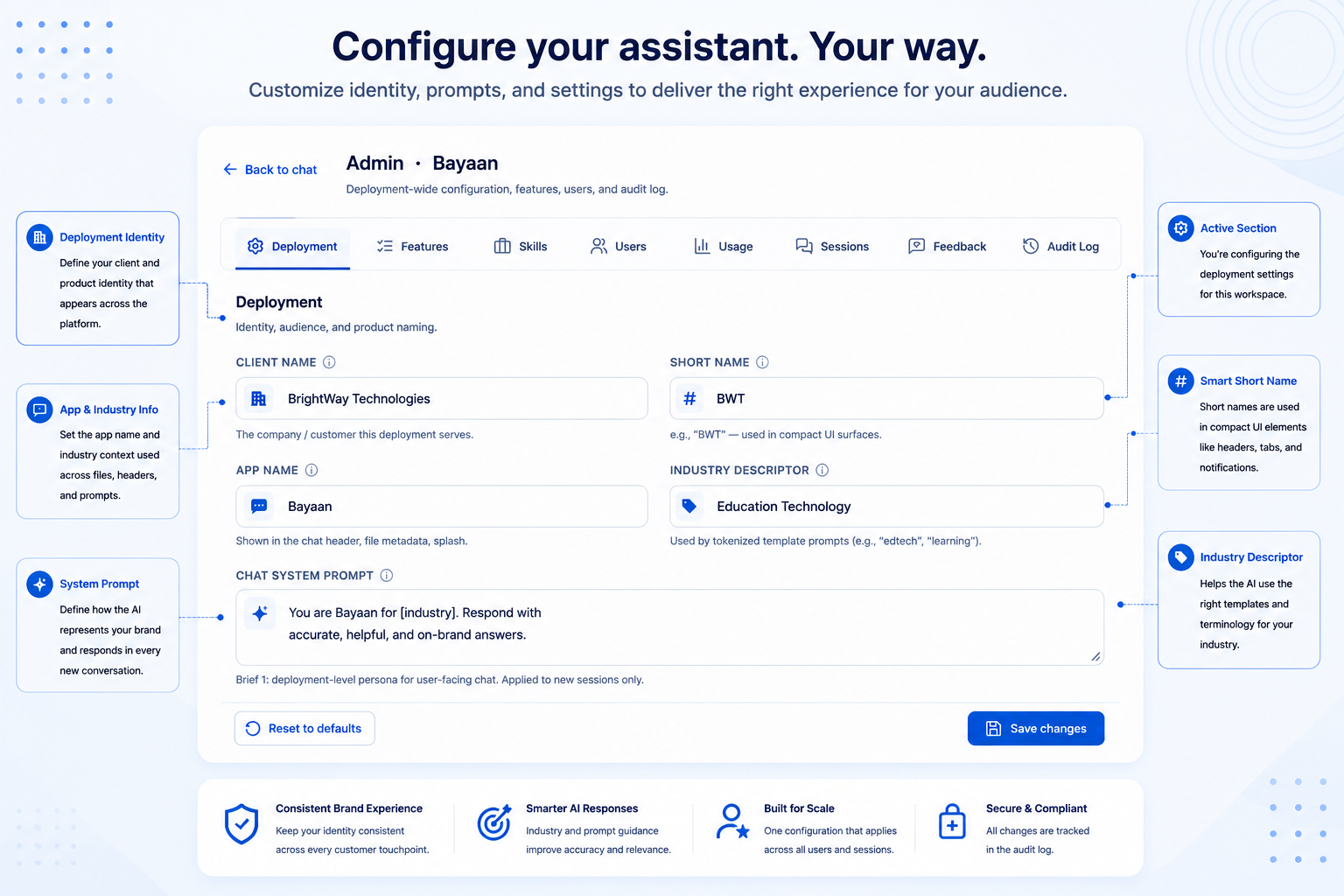
Feature management
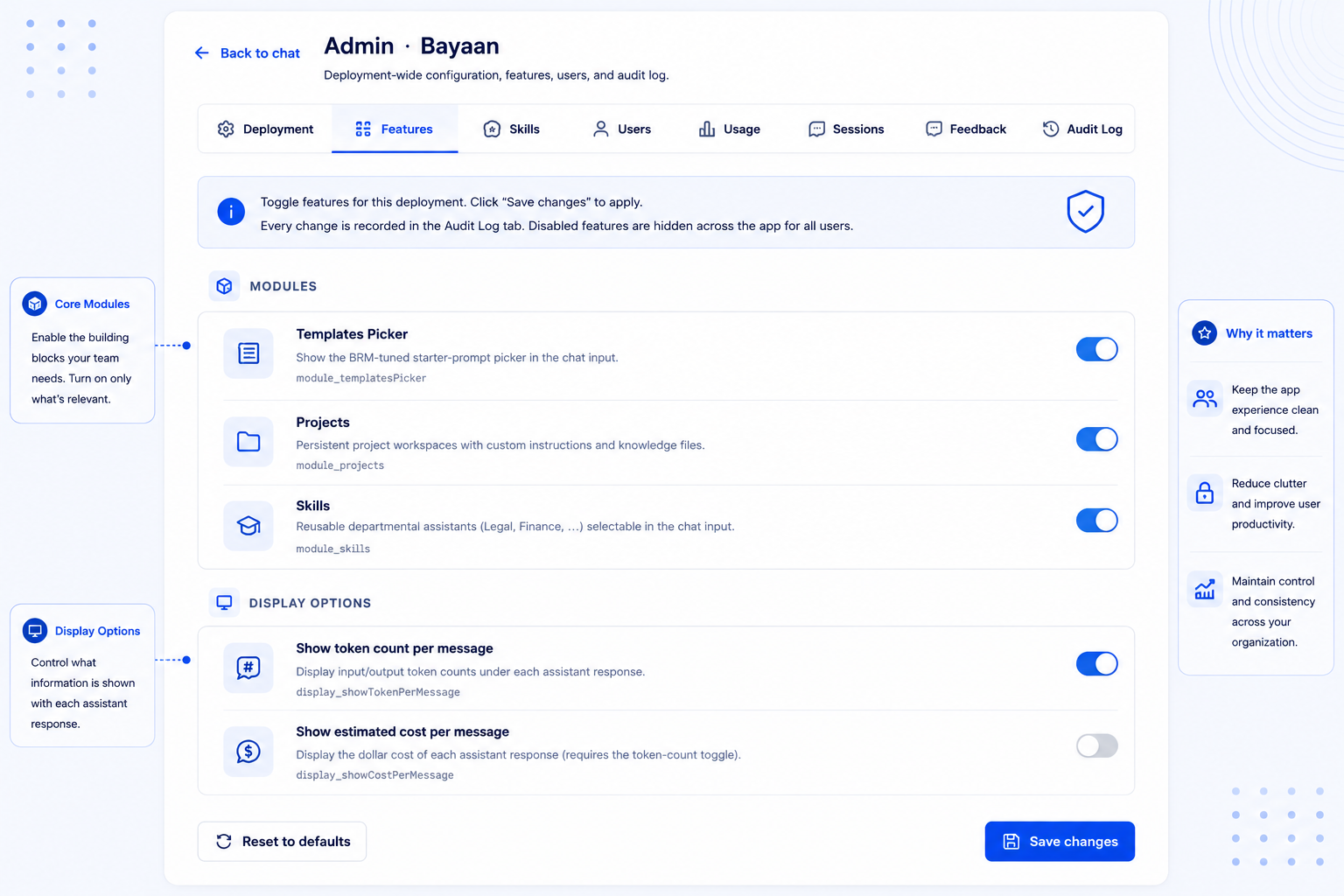
Not every team needs every capability on day one. Bayaan lets authorized admins enable or restrict modules and features at the organization level. Start with the workflows your teams are ready to govern, then expand access as processes, policies, and adoption mature.
User management
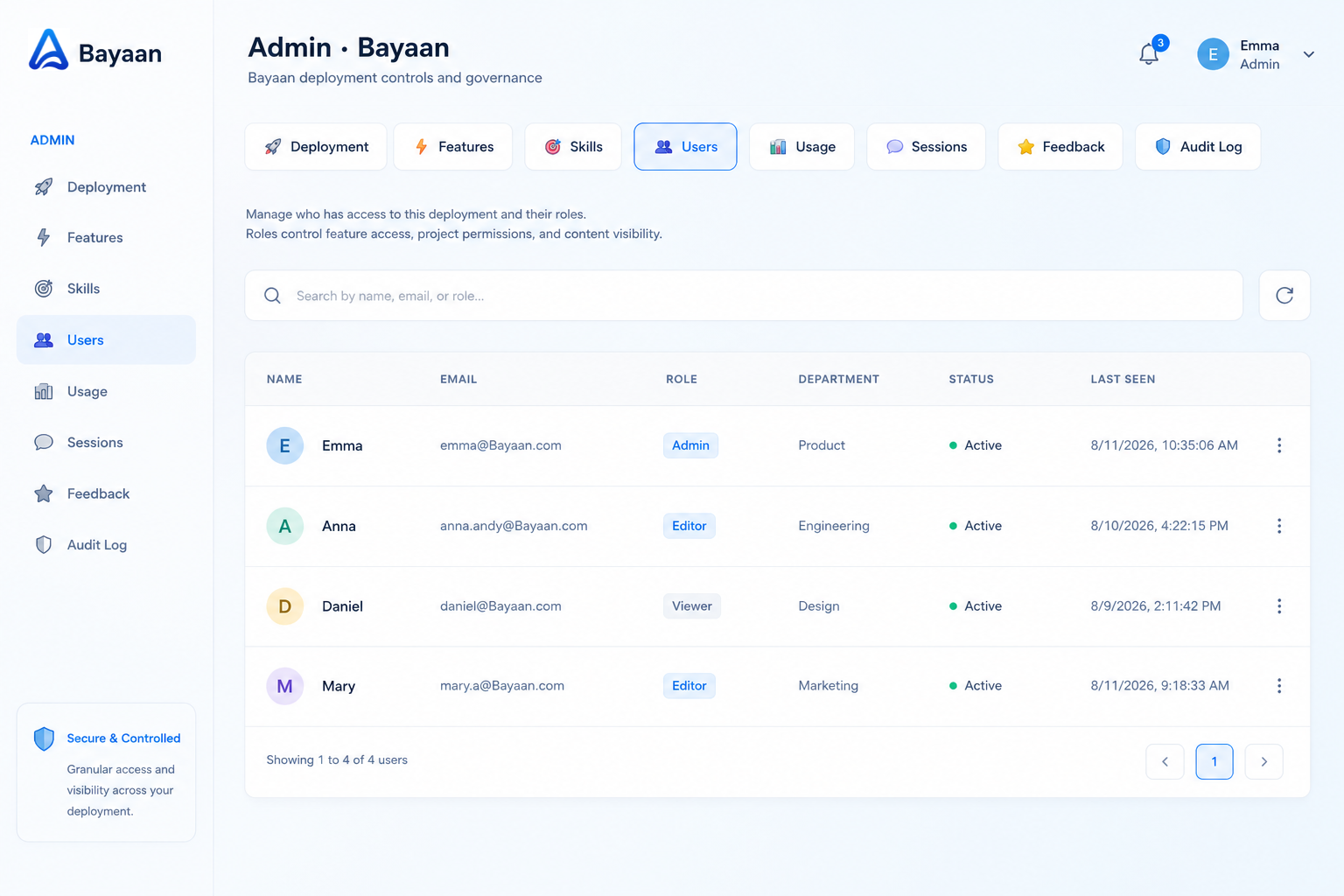
Maintain a clear view of the people using Bayaan and the context they work within. Centralized user management helps administrators keep workspace access current and understand who is actively using the platform.
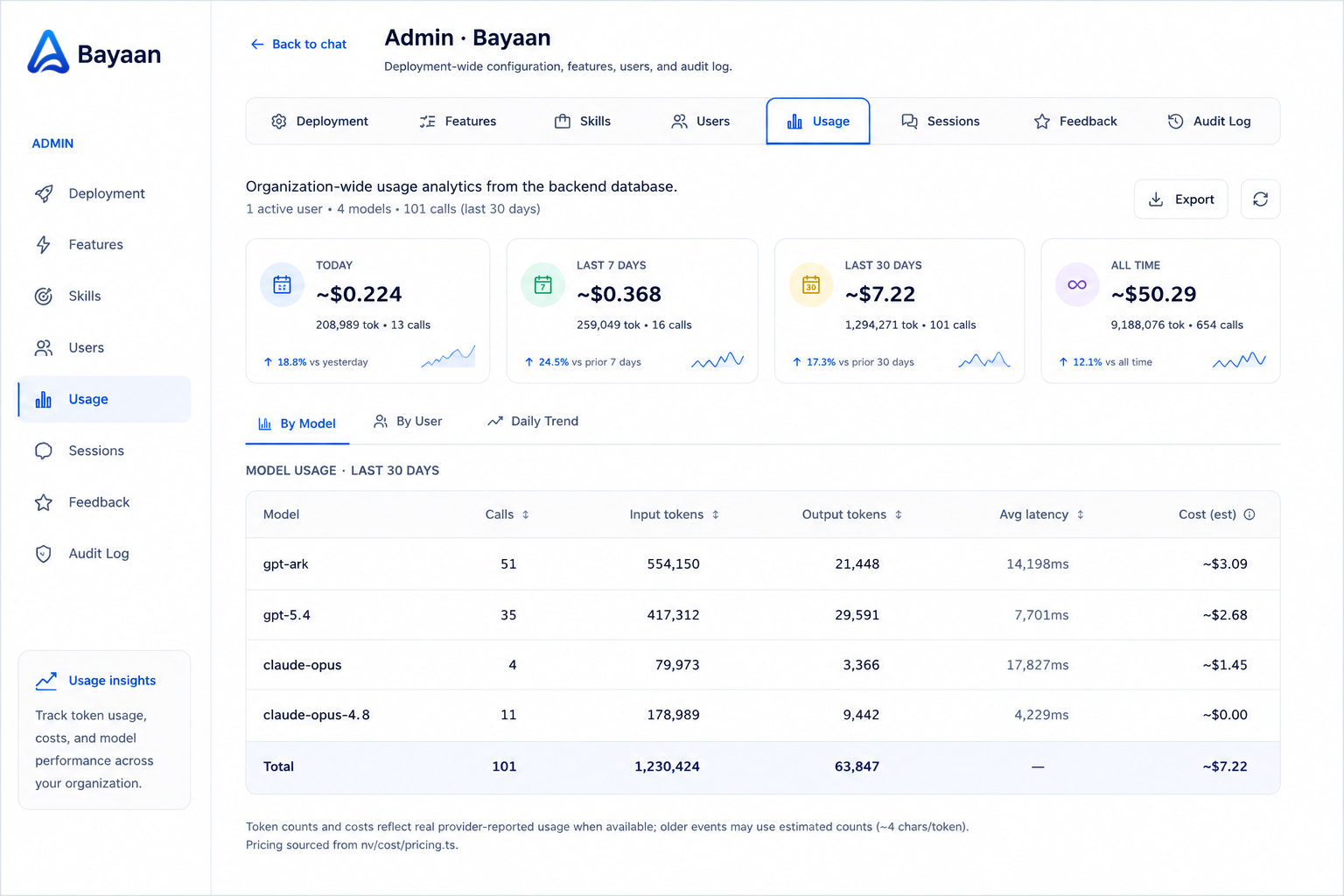
Usage analytics
See how Bayaan is being used across the organization. Monitor key indicators, assistant activity, model usage, and usage patterns from one analytics view.
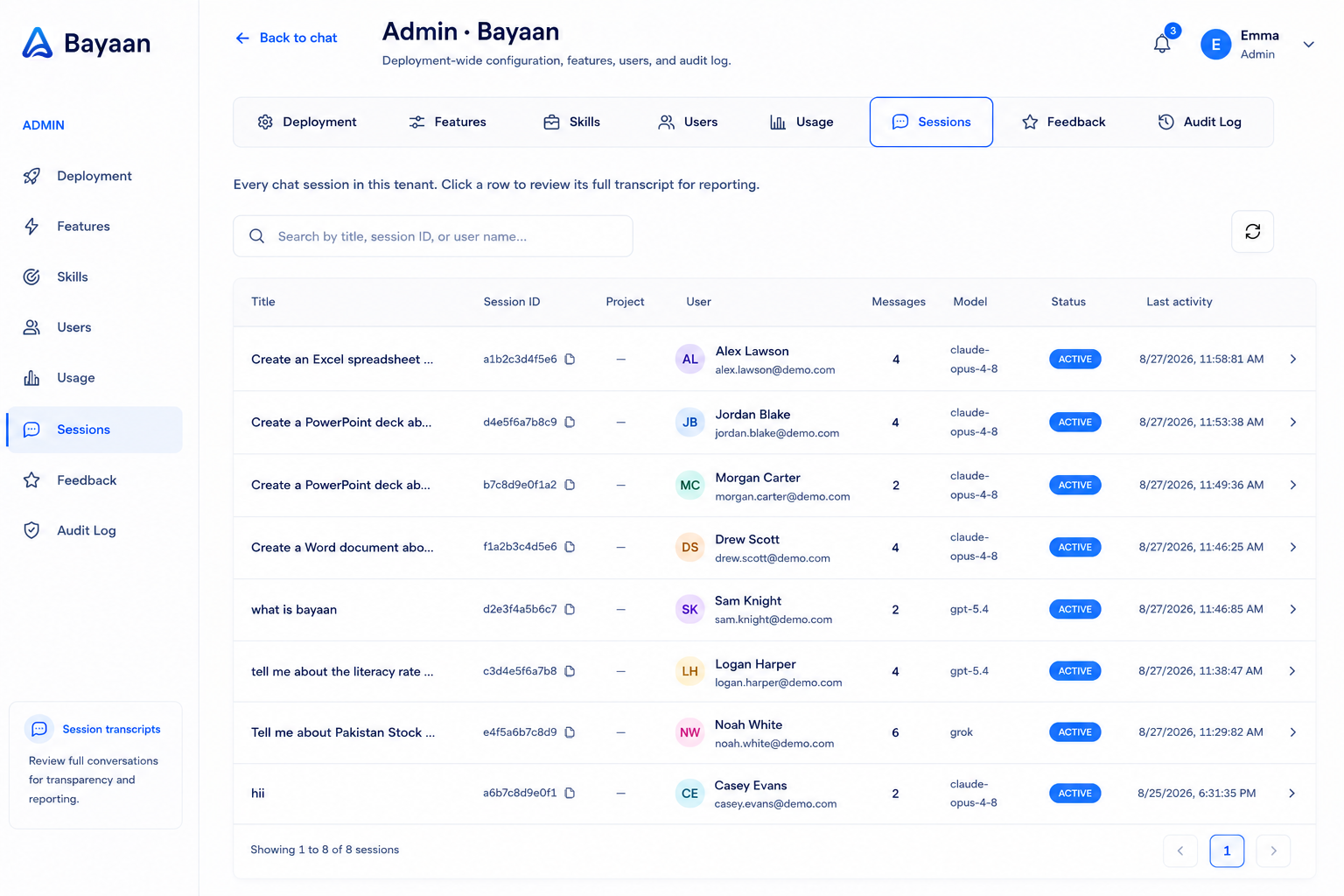
Operational oversight
Review sessions across the organization without relying on fragmented activity signals. Track session status, message counts, active and inactive sessions, and session-level activity.
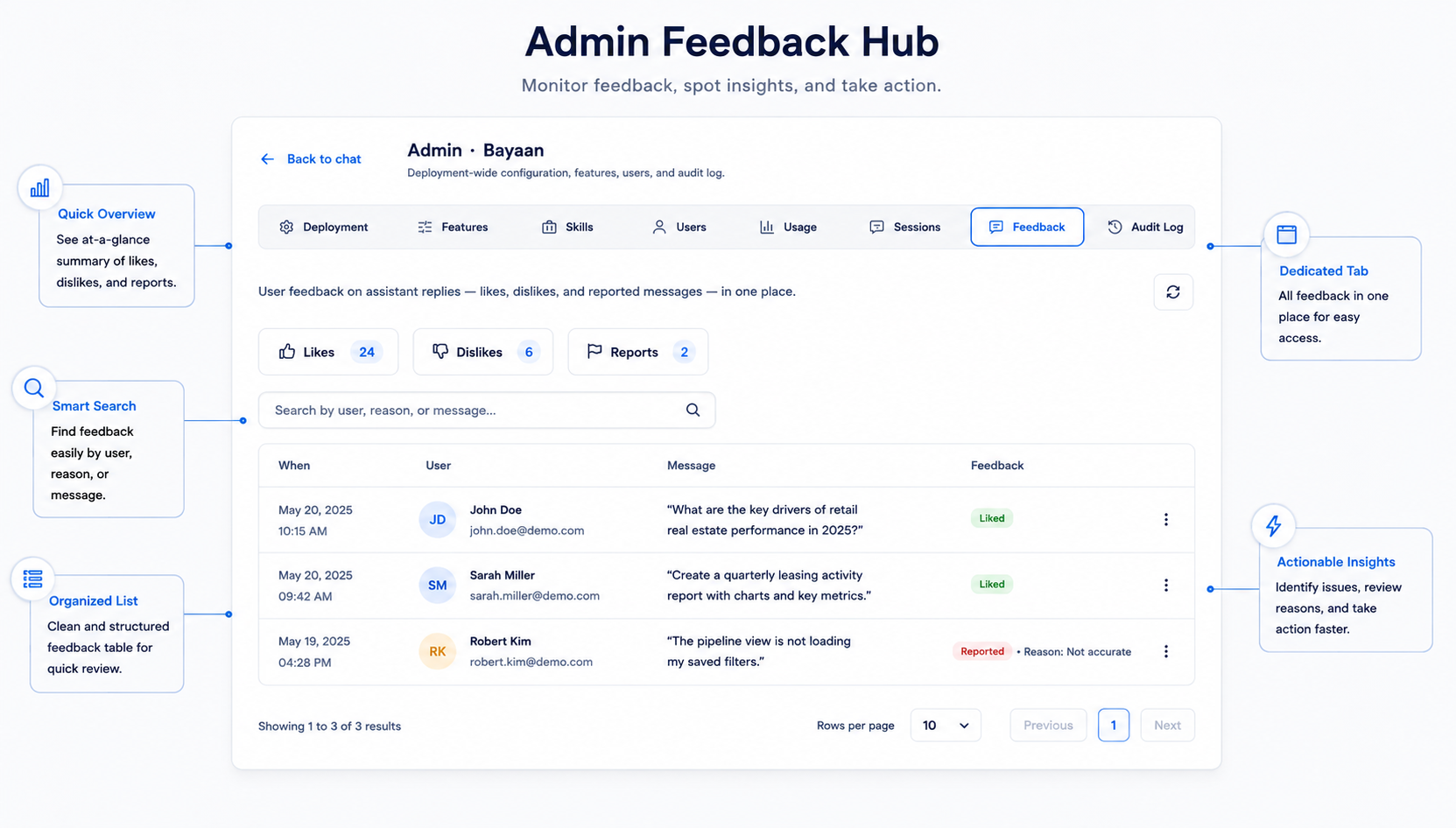
Review liked, disliked, and reported chats with individual-user context.
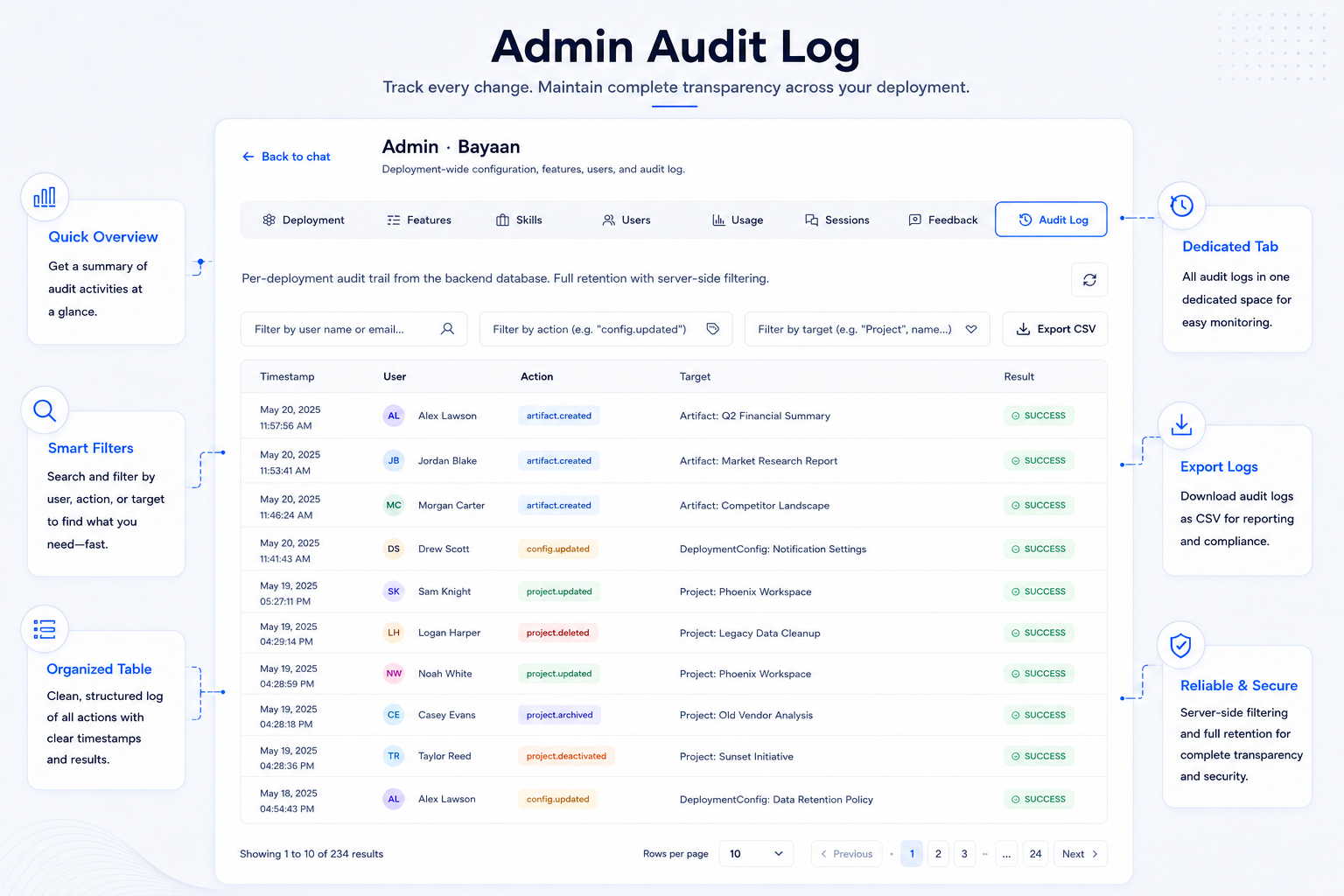
Searchable audit logs
When settings and access change, administrators need to know what happened. Bayaan maintains an audit trail that records the user, action, target, and result of administrative events.
Built for accountable AI operations
Configure the deployment, manage users and roles, and control which features are available.
Review adoption, model use, sessions, and feedback to guide rollout and enablement.
Review administrative activity, workspace access, and exportable audit records.
Standardize themes, formatting, layouts, and artifact expectations across generated work.
Organization mode
Admin Control operates behind the everyday Bayaan workspace. Users can focus on asking questions, working within projects, and generating finished deliverables, while authorized admins manage the environment, access, rollout, and oversight behind it. Admin Control is available in Organization mode; Individual mode does not display the organization admin panel.
Bayaan Admin Control is the organization-level console used by authorized admins and super admins to manage deployment settings, branding, features, users, usage analytics, sessions, feedback, and audit logs.
For teams researching what is bayaan admin control, the practical priority is a clear connection between business context, trusted data, and an actionable result. Bayaan brings that context into a governed enterprise AI workspace so users can move from a natural language question to a useful answer with less manual work.
This approach supports stronger search visibility for enterprise AI, conversational analytics, and secure business automation while keeping the workflow focused on reviewable outcomes. Organizations can apply role based access, source aware answers, and repeatable processes as adoption grows across departments.
No. The Admin Control panel is available in Organization mode. Individual users receive the individual workspace experience without organization-wide administration features.
For teams researching is admin control available in individual mode, the practical priority is a clear connection between business context, trusted data, and an actionable result. Bayaan brings that context into a governed enterprise AI workspace so users can move from a natural language question to a useful answer with less manual work.
This approach supports stronger search visibility for enterprise AI, conversational analytics, and secure business automation while keeping the workflow focused on reviewable outcomes. Organizations can apply role based access, source aware answers, and repeatable processes as adoption grows across departments.
Yes. Administrators can configure workspace branding and output standards, including the theme, logo, favicon, fonts, styles, file formatting, layouts, page margins, and artifact-related settings.
For teams researching can administrators customize bayaan to match our brand, the practical priority is a clear connection between business context, trusted data, and an actionable result. Bayaan brings that context into a governed enterprise AI workspace so users can move from a natural language question to a useful answer with less manual work.
This approach supports stronger search visibility for enterprise AI, conversational analytics, and secure business automation while keeping the workflow focused on reviewable outcomes. Organizations can apply role based access, source aware answers, and repeatable processes as adoption grows across departments.
Yes. Authorized administrators can enable or restrict modules and features at the organization level, allowing the workspace to be rolled out around organizational requirements.
For teams researching can we control which bayaan features users can access, the practical priority is a clear connection between business context, trusted data, and an actionable result. Bayaan brings that context into a governed enterprise AI workspace so users can move from a natural language question to a useful answer with less manual work.
This approach supports stronger search visibility for enterprise AI, conversational analytics, and secure business automation while keeping the workflow focused on reviewable outcomes. Organizations can apply role based access, source aware answers, and repeatable processes as adoption grows across departments.
Usage Analytics includes organization KPIs, model usage, user-wise activity, and daily trends. Administrators can also export usage data for further review.
For teams researching what can administrators see in usage analytics, the practical priority is a clear connection between business context, trusted data, and an actionable result. Bayaan brings that context into a governed enterprise AI workspace so users can move from a natural language question to a useful answer with less manual work.
This approach supports stronger search visibility for enterprise AI, conversational analytics, and secure business automation while keeping the workflow focused on reviewable outcomes. Organizations can apply role based access, source aware answers, and repeatable processes as adoption grows across departments.
Bayaan records administrative event details including the user, action, target, and result. Authorized admins can search, filter, review, and export the logs as CSV.
For teams researching what does bayaan record in its audit logs, the practical priority is a clear connection between business context, trusted data, and an actionable result. Bayaan brings that context into a governed enterprise AI workspace so users can move from a natural language question to a useful answer with less manual work.
This approach supports stronger search visibility for enterprise AI, conversational analytics, and secure business automation while keeping the workflow focused on reviewable outcomes. Organizations can apply role based access, source aware answers, and repeatable processes as adoption grows across departments.
Yes. Admins can review session status and message counts, monitor active and inactive sessions, and view liked, disliked, or reported chats with user-level context.
For teams researching can admins review sessions and user feedback, the practical priority is a clear connection between business context, trusted data, and an actionable result. Bayaan brings that context into a governed enterprise AI workspace so users can move from a natural language question to a useful answer with less manual work.
This approach supports stronger search visibility for enterprise AI, conversational analytics, and secure business automation while keeping the workflow focused on reviewable outcomes. Organizations can apply role based access, source aware answers, and repeatable processes as adoption grows across departments.
Admin Control
See how Bayaan can be configured around your users, brand, workflows, and governance requirements.