Continue project analysis with the team context.
Open chatProjects Scope
Keep every project'schats, files & knowledgein one AI workspace
Important work rarely lives in a single chat. Bayaan Projects Scope gives every initiative a dedicated AI workspace - chats, files, generated artifacts, reusable knowledge, team access, and instructions, all organized around the same objective.
KnowledgeShared reference
Quarterly Portfolio ReviewActive project
Flag leases expiring within the next two quarters.
Open chatArtifactsFinished work
One project. One working context.
The complete body of work stays together.
A project can begin with a question and end with a report, workbook, or presentation - Projects Scope keeps that whole body of work in one place instead of scattered across disconnected sessions. Use it for a client engagement, reporting cycle, research initiative, or any other defined workstream.
Bayaan
Quarterly PortfolioReviewActive
Chats
Keep project conversations connected to the objective they support. Return to prior analysis with the team context intact.
Inside the project
Every part of the project, connected.
Uploaded files and notes contribute project knowledge; chats remain associated with the workstream; generated artifacts stay available alongside their supporting context; and members and settings govern the workspace.
Chats
Keep every project conversation easy to return to
Start a new chat when the project moves into a new question or line of work. Open an existing chat when you need to continue from previous project activity. Delete chats that no longer belong in the project.Conversations remain associated with the work they support, so a team can return to the relevant discussion without searching through unrelated sessions.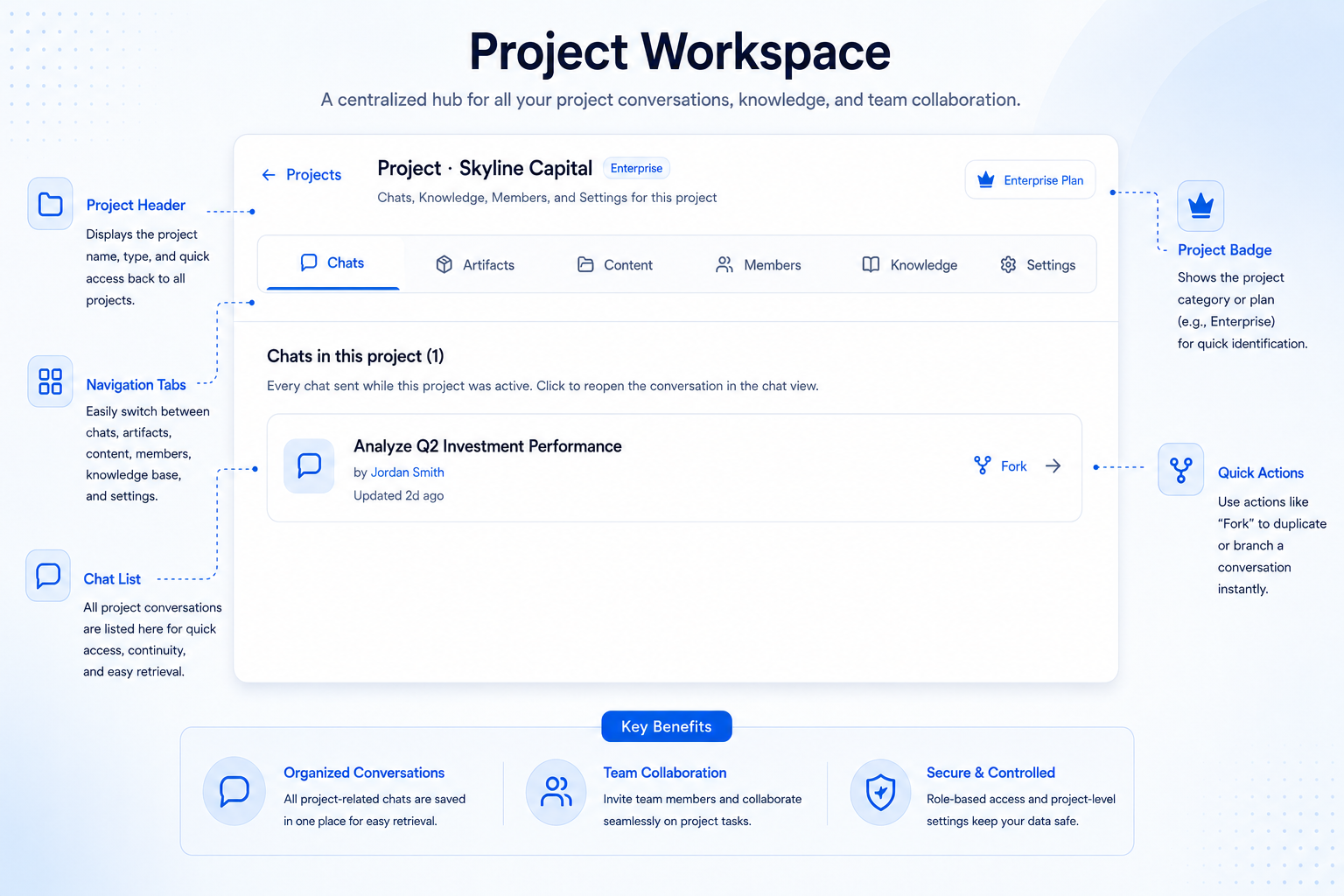
Artifacts
Move from conversation to finished work without losing the project
Bayaan-generated documents, decks, sheets, and other outputs are available from the project's Artifacts area.A conversation can develop into a draft, a structured workbook, or a presentation without the final output becoming detached from the workspace in which it was created.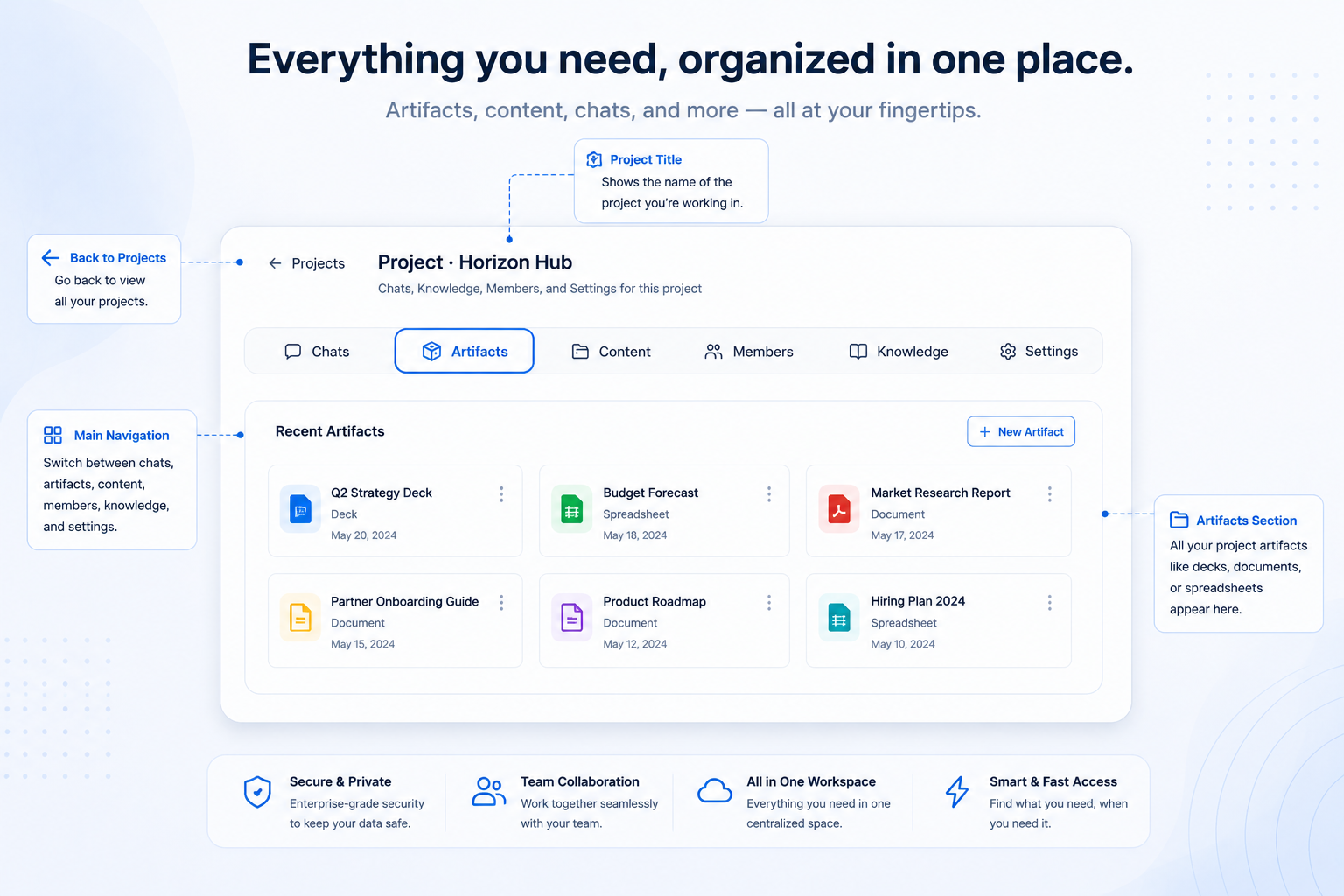
Files
Keep project inputs separate from project knowledge
Upload and manage the source files used by the project, including working material, reference documents, spreadsheets, and other inputs that belong with the workstream.Files are the project's managed source materials, kept accessible alongside the chats and work they inform.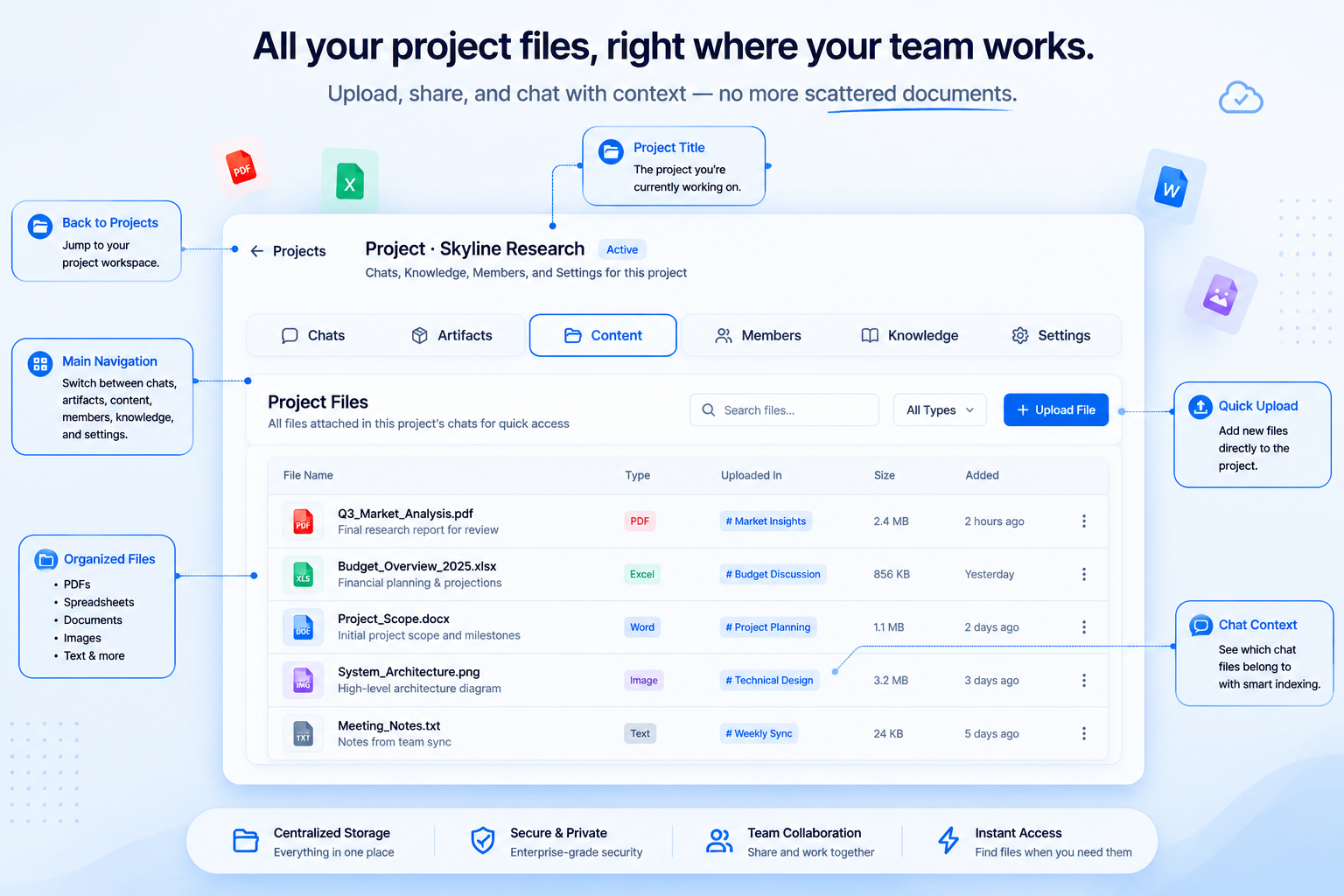
Members
Collaborate with clear project roles
Projects Scope supports Owner, Editor, and Viewer roles. Members can also leave a project.Participation can be aligned with how each person is expected to work inside the project rather than giving every member the same relationship to the workspace.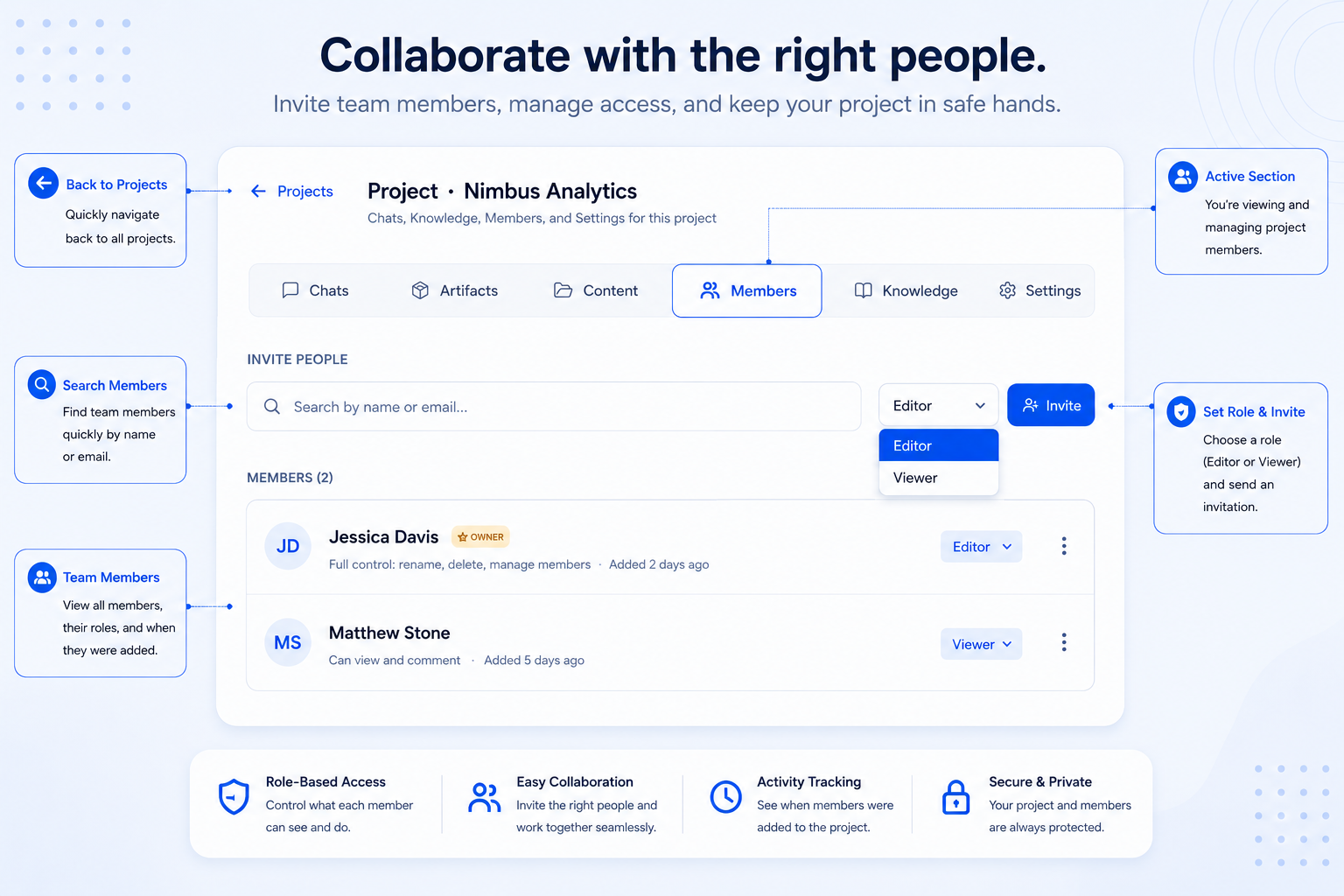
Knowledge
Build a project-specific knowledge base
Build shared reference by uploading files and adding notes for definitions, background, instructions, approved notes, and supporting material.Knowledge is the curated context assembled for the project, so Bayaan retains the right reference for every conversation.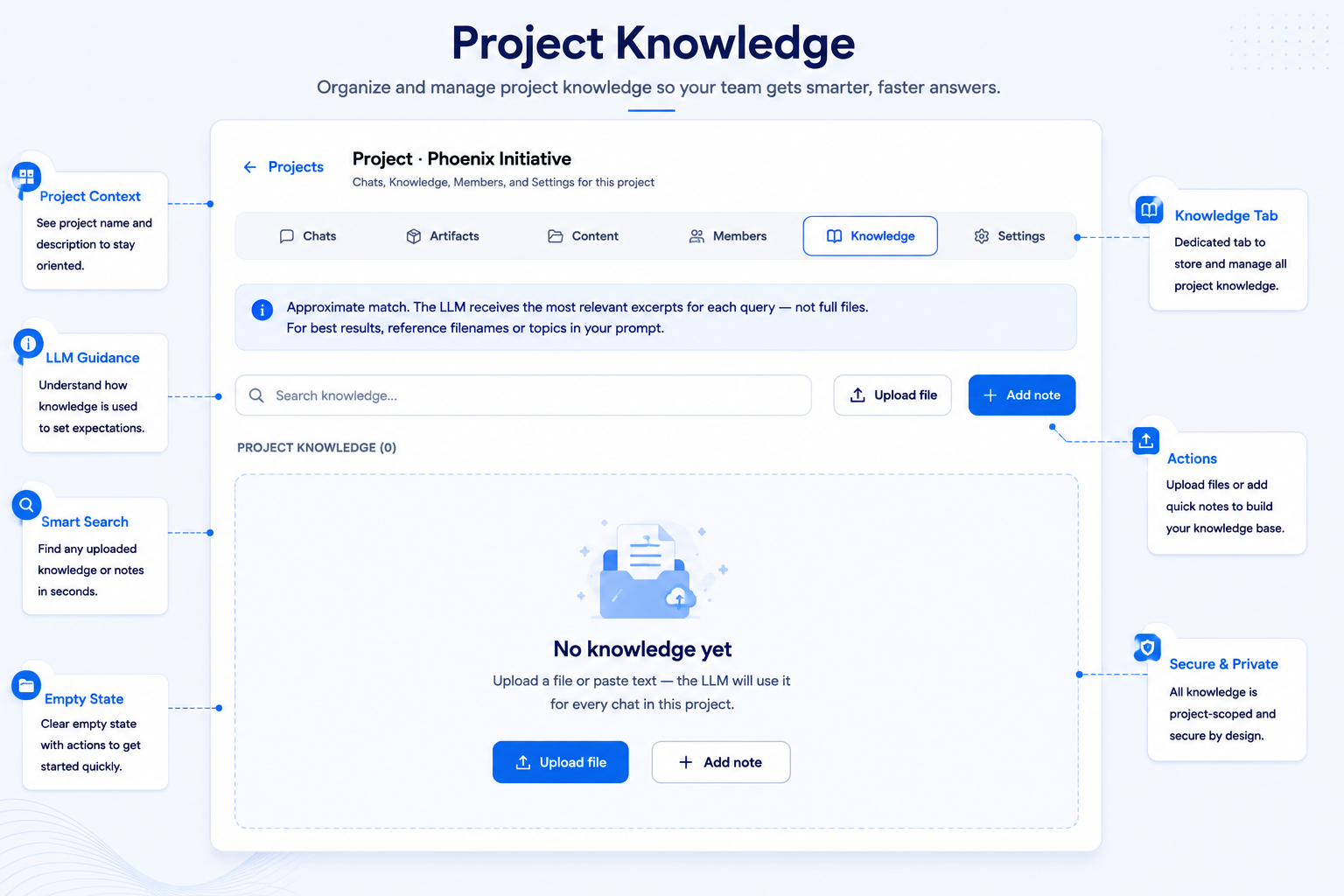
Settings
Give the project its own operating instructions
Set a recognizable project name, add custom instructions, and manage the project lifecycle from Settings.Use instructions for project-specific terminology, output expectations, audience context, or other standing guidance that should not need to be repeated in every conversation.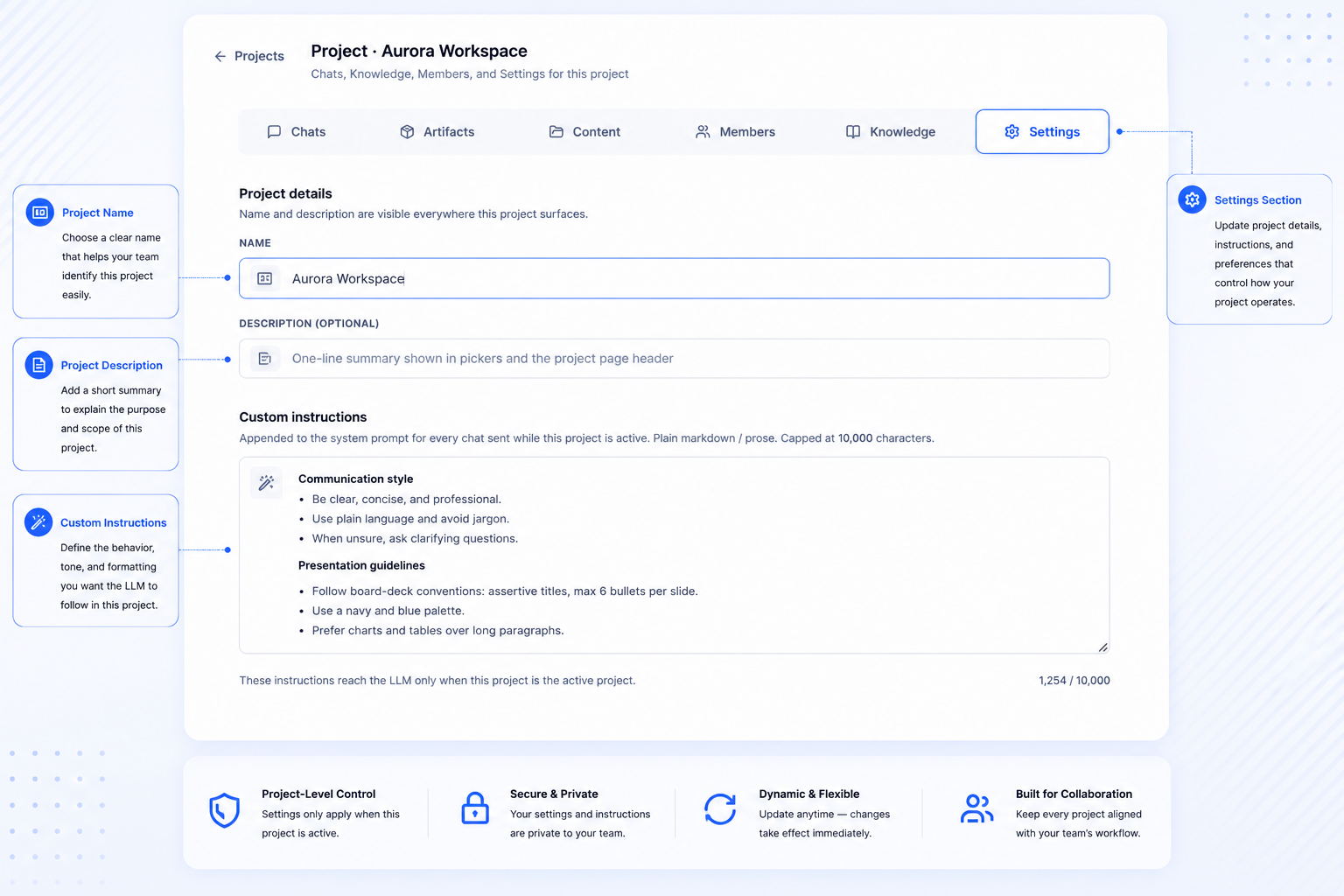
Files and knowledge
Keep project inputs separate from project knowledge.
Managed source materials
Upload and manage the working material, reference documents, spreadsheets, and other source inputs used by the project.
Curated shared context
Use uploaded files and notes for the definitions, background, instructions, approved notes, and supporting material the project should retain as shared reference.
A practical project workflow
From project context to governed, usable work.
Step 01
Create the project
Start with a name that reflects the client, initiative, reporting cycle, or workstream. This becomes the boundary for everything that follows.Step 02
Add project context
Bring together the files, notes, source material, and standing instructions that give the project its working context.Step 03
Invite the right members
Give collaborators the role they need so ownership, editing, and viewing are clear from the start.Step 04
Work through project chats
Continue analysis over multiple conversations without losing the materials, decisions, and people behind the work.Step 05
Create project artifacts
Turn the work into usable documents, spreadsheets, and decks while keeping the results connected to the project.Step 06
Maintain the workspace
Keep the project current by managing chats, source files, shared knowledge, members, and instructions.Built for projects where context matters as much as the answer
One workspace for the work that needs continuity.
01
Client and advisory work
Keep client-specific conversations, reference files, approved notes, generated deliverables, and collaborators inside a dedicated project.
02
Reporting cycles
Organize source workbooks, analytical conversations, project instructions, and the final presentation or report around the same reporting period.
03
Research and analysis
Store the material under review, capture project notes, continue investigations through multiple chats, and keep the outputs available for later review.
04
Commercial real estate workflows
Keep portfolio files, definitions, conversations, and a generated review deck together for a CRE workstream.
Frequently Asked Questions
What is an AI project workspace?
A Bayaan project workspace is a dedicated environment for one defined body of work. It brings together the conversations, source material, decisions, collaborators, and generated outputs that belong to the same initiative.
Instead of reopening a blank AI chat and reconstructing the background each time, a team can return to the project and continue from its established context. Each workspace includes Chats, Artifacts, Files, Members, Knowledge, and Settings.
For teams researching what is an ai project workspace, the practical priority is a clear connection between business context, trusted data, and an actionable result. Bayaan brings that context into a governed enterprise AI workspace so users can move from a natural language question to a useful answer with less manual work.
This approach supports stronger search visibility for enterprise AI, conversational analytics, and secure business automation while keeping the workflow focused on reviewable outcomes. Organizations can apply role based access, source aware answers, and repeatable processes as adoption grows across departments.
What can I keep inside a Bayaan project?
A project can hold the active conversations that move the work forward, the files used as source material, and the knowledge the team wants Bayaan to retain as shared reference.
It also keeps generated documents, workbooks, and presentations close to the discussions that created them. Members, roles, and standing instructions stay attached to the project so the working environment remains clear as the work develops.
For teams researching what can i keep inside a bayaan project, the practical priority is a clear connection between business context, trusted data, and an actionable result. Bayaan brings that context into a governed enterprise AI workspace so users can move from a natural language question to a useful answer with less manual work.
This approach supports stronger search visibility for enterprise AI, conversational analytics, and secure business automation while keeping the workflow focused on reviewable outcomes. Organizations can apply role based access, source aware answers, and repeatable processes as adoption grows across departments.
What is the difference between Files and Knowledge?
Files are the materials a team uploads and manages within a project, such as spreadsheets, reference documents, working papers, and source data.
Knowledge is the curated reference layer for the project. Teams can use it for approved definitions, notes, background, and instructions that should inform future work, helping separate raw inputs from the context worth carrying forward.
For teams researching what is the difference between files and knowledge, the practical priority is a clear connection between business context, trusted data, and an actionable result. Bayaan brings that context into a governed enterprise AI workspace so users can move from a natural language question to a useful answer with less manual work.
This approach supports stronger search visibility for enterprise AI, conversational analytics, and secure business automation while keeping the workflow focused on reviewable outcomes. Organizations can apply role based access, source aware answers, and repeatable processes as adoption grows across departments.
What types of artifacts can a project contain?
Artifacts are the finished or in-progress outputs created through the project. They can include documents, spreadsheets, presentations, and other deliverables generated from project conversations and materials.
Keeping these outputs in the same workspace makes it easier to find the supporting chat, source material, and shared context behind a result when the team returns for review or revision.
For teams researching what types of artifacts can a project contain, the practical priority is a clear connection between business context, trusted data, and an actionable result. Bayaan brings that context into a governed enterprise AI workspace so users can move from a natural language question to a useful answer with less manual work.
This approach supports stronger search visibility for enterprise AI, conversational analytics, and secure business automation while keeping the workflow focused on reviewable outcomes. Organizations can apply role based access, source aware answers, and repeatable processes as adoption grows across departments.
Which project member roles are available?
Projects Scope supports Owner, Editor, and Viewer roles. These roles give teams a straightforward way to align access with each person's involvement in the work.
An Owner can oversee the project, Editors can contribute to it, and Viewers can follow the work with the appropriate level of access. Members can also leave a project when their involvement ends.
For teams researching which project member roles are available, the practical priority is a clear connection between business context, trusted data, and an actionable result. Bayaan brings that context into a governed enterprise AI workspace so users can move from a natural language question to a useful answer with less manual work.
This approach supports stronger search visibility for enterprise AI, conversational analytics, and secure business automation while keeping the workflow focused on reviewable outcomes. Organizations can apply role based access, source aware answers, and repeatable processes as adoption grows across departments.
Can every project have its own instructions?
Yes. Every project can have custom instructions alongside its name and other settings. These instructions give Bayaan standing guidance for work performed within that particular project.
Teams can use them to establish terminology, preferred outputs, audience expectations, approved analytical approaches, or other context that should not need to be repeated in every new chat.
For teams researching can every project have its own instructions, the practical priority is a clear connection between business context, trusted data, and an actionable result. Bayaan brings that context into a governed enterprise AI workspace so users can move from a natural language question to a useful answer with less manual work.
This approach supports stronger search visibility for enterprise AI, conversational analytics, and secure business automation while keeping the workflow focused on reviewable outcomes. Organizations can apply role based access, source aware answers, and repeatable processes as adoption grows across departments.
Can chats or entire projects be removed?
Individual chats can be removed when they no longer belong to the workstream. Project settings also provide lifecycle controls for deactivating or deleting a project when the work is complete.
Those actions should be handled deliberately because they affect the project's ongoing body of work. The workspace keeps these controls with the project rather than leaving them distributed across separate conversations.
For teams researching can chats or entire projects be removed, the practical priority is a clear connection between business context, trusted data, and an actionable result. Bayaan brings that context into a governed enterprise AI workspace so users can move from a natural language question to a useful answer with less manual work.
This approach supports stronger search visibility for enterprise AI, conversational analytics, and secure business automation while keeping the workflow focused on reviewable outcomes. Organizations can apply role based access, source aware answers, and repeatable processes as adoption grows across departments.
Is Projects Scope a replacement for project-management software?
Projects Scope organizes the AI work around an initiative: conversations, source files, knowledge, generated outputs, collaborators, and project-level guidance.
It does not replace task schedules, Gantt charts, resource planning, dependencies, or portfolio management. Teams can keep their established project-management tools while using Bayaan to preserve the context behind the work.
For teams researching is projects scope a replacement for project-management software, the practical priority is a clear connection between business context, trusted data, and an actionable result. Bayaan brings that context into a governed enterprise AI workspace so users can move from a natural language question to a useful answer with less manual work.
This approach supports stronger search visibility for enterprise AI, conversational analytics, and secure business automation while keeping the workflow focused on reviewable outcomes. Organizations can apply role based access, source aware answers, and repeatable processes as adoption grows across departments.
Projects Scope
Bring the complete project into one workspace
Projects Scope is where Bayaan's conversations, source material, project knowledge, generated work, and collaboration meet.
See how a real project can move from context and conversation to governed, usable work.