

In this article
Moving data between systems sounds like the easy part of a CRE data project, right up until a rent roll pulled through one integration path shows a different total than the same rent roll pulled through another. Files copy cleanly. What breaks is everything files don't carry with them: which record IDs map to which tenant, what grain a table is at, who is allowed to see it, and how fresh it actually is.
The real integration challenge is not moving data from Yardi, MRI, or CoStar into a warehouse or dashboard. It is preserving identity, grain, definitions, permissions, and refresh logic while that data crosses from one system's assumptions into another's. This article covers the integration methods CRE teams actually use, how they apply to common systems, and a framework for choosing the right method for a given data object.
Key takeaways
- Integration is not just data movement. The harder problem is preserving record identity, grain, permissions, and refresh timing as data crosses from one system into another.
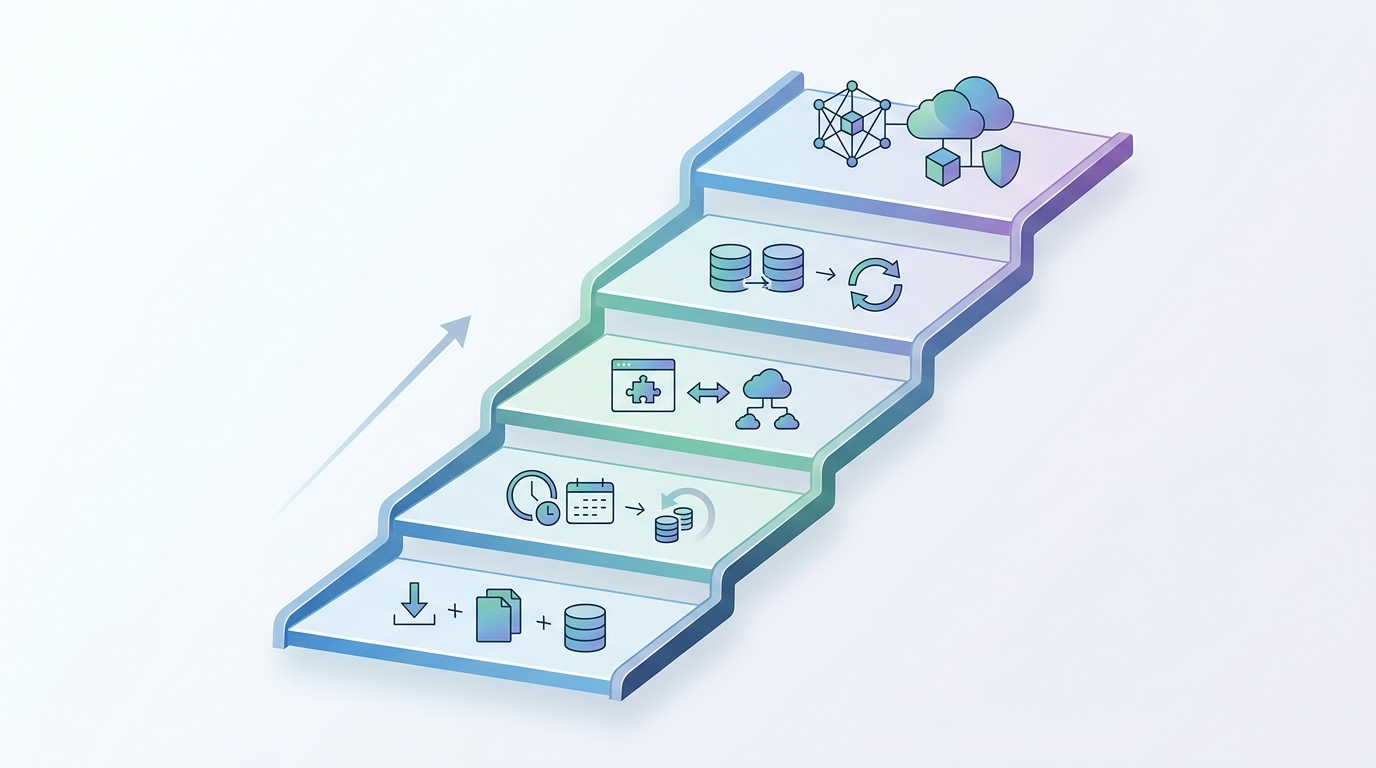
- Manual exports, scheduled files, APIs/connectors, database replication, and governed shared models form a rough maturity ladder, each solving more of the integration problem than the one before it.
- Yardi Voyager exposes a web-service API for commercial property, unit, lease, and rent roll data, and a separate managed feed (Data Connect) purpose-built for Power BI.
- MRI Software's integration layer, called MRI Information eXchange (MIX), is an ecosystem of APIs built by MRI and partners for exchanging data with third-party and custom systems.
- CoStar is not one integration story. Its core market-data product has no public self-serve API and restricts automated extraction, while CoStar Real Estate Manager, its lease administration product, offers API, file-based, and middleware integration options.
- Excel is not a system to integrate with in the same sense as the others. It is a file format that other integrations often land in or start from, which makes it valuable but also a common source of untracked manual edits.
What CRE data integration actually requires
Commercial real estate data integration is the process of moving data between the systems that generate it, such as property management, accounting, leasing, and market-data platforms, while preserving what makes that data trustworthy: consistent record IDs, the correct grain, agreed metric definitions, appropriate access permissions, and predictable refresh timing.
Treating integration as a pure plumbing problem, get data from system A into system B, misses most of what actually goes wrong. A rent roll extracted from a property management system and a GL export from an accounting platform can both be technically correct and still disagree once combined, because one uses a tenant ID that doesn't match the other's naming convention, or because one reflects today's state and the other reflects last month's close. Integration done well resolves these mismatches once, in a governed way, rather than leaving every downstream report to reconcile them independently.
The integration methods available
CRE teams typically reach for one of five broad methods, each with a different tradeoff between setup effort and reliability:
| Method | How it works | Typical fit |
|---|---|---|
| Manual export | A person runs a report and downloads a file | Ad hoc, one-off, or very low-frequency needs |
| Scheduled file | A system automatically generates and delivers a file (CSV, flat file) on a fixed schedule | Batch financial or operational feeds where near-real-time is not required |
| API/connector | A system exposes a web-service interface that a third party can call to pull or push specific data | Structured objects that need more frequent or on-demand access |
| Database access/replication | Data is copied or synced at the database level, often through a managed feed | High-volume, high-frequency reporting or BI needs |
| Governed shared model | Multiple sources are reconciled into one access-controlled model with defined IDs, grain, and metric logic | Portfolio-wide analytics and AI use cases that span several systems |
Choosing a method is a function of the data object's volatility, its sensitivity, and how many downstream consumers depend on it. A quarterly valuation update may be perfectly well served by a manual export. A rent roll feeding a daily dashboard is not.
How this looks across common CRE systems
The specific integration options differ meaningfully by vendor and by which product within a vendor's suite is involved.
Yardi
Yardi Voyager exposes a web service interface, the Commercial API, that provides the ability to export commercial data from Yardi Voyager databases, including property, unit, lease, and rent roll information. Separately, Yardi offers Data Connect, which automates dataflows from Voyager and other sources into Microsoft Power BI, eliminating manual exports, and works with an organization's existing Microsoft Azure and Power BI environment rather than requiring a separate platform. That distinction matters for planning: the Commercial API is a general-purpose data-export interface, while Data Connect is a managed feed purpose-built for one downstream tool.
MRI Software
MRI's integration layer, MRI Information eXchange (MIX), is an ecosystem of secure APIs built by MRI and its partners that offers control over the information exchange between MRI and third-party applications, and includes a toolkit for building custom APIs for home-grown systems. In practice, MRI environments vary in how much of this API layer is enabled for a given customer and role, so confirming actual API access and licensing early in a project avoids planning around capability that isn't provisioned.
CoStar
CoStar is not a single integration story, and conflating its products is a common planning mistake. CoStar's core market-data product, covering property records, lease and sale comps, and market analytics, has no public API, and its terms of use prohibit automated extraction of that data. CoStar Real Estate Manager, a separate lease administration product, is different: it offers API-based integration alongside file-based and middleware connection options, supporting secure, scheduled, and event-driven data exchange with ERP, accounting, and BI platforms. A team planning to connect "CoStar" needs to know which CoStar product it actually means before choosing an integration method.
Excel
Excel is not a system in the same sense as the platforms above; it is a file format, and it plays two roles in most CRE integration architectures. It is often the landing point for scheduled exports and manual reports, and it is frequently a working document that gets manually edited after export, which means an Excel-based data path needs its own tracking to distinguish the original exported values from anything changed by hand afterward.
Master data and reconciliation across integrated systems
Every integration touches master data: the canonical list of properties, tenants, and leases that every source system should agree on. When Yardi's tenant ID, MRI's tenant ID, and a CRM's tenant record do not map cleanly to the same canonical entity, integration moves the mismatch downstream instead of resolving it, and it resurfaces as a reconciliation problem in whatever tool consumes the combined data.
Reconciliation logic, checking that a rent roll total matches the corresponding GL rental income line, or that a CapEx total matches project-level source records, has to be built into the integration itself rather than left for an analyst to catch after the fact. The earlier a mismatch is caught in the pipeline, the cheaper it is to fix.
Refresh logic, error handling, and security
Refresh timing has to be explicit, not assumed. A scheduled file that runs nightly and an API that can be called on demand behave very differently when someone asks "is this number current as of right now," and a governed integration states, for each data object, how current it actually is rather than leaving that implicit.
Error handling matters more in CRE integration than it might elsewhere, because a silent failure, an export that runs but returns zero rows because of an expired credential, for example, produces a report that looks complete but is actually stale or empty. Integrations should fail loudly, with alerts, rather than failing quietly and letting a downstream report present old or missing data as current.
Security follows the same permission model that applies inside the source systems. If a leasing associate cannot see fund-level ownership splits inside the property management system, the integration should not expose that data more broadly just because it has been copied into a warehouse or dashboard. Permissions need to travel with the data, not reset to "open" the moment it leaves its system of record.
The Integration Ladder — Manual Export → Scheduled File → API/Connector → Database/Replication → Governed Shared Model
CRE integration maturity follows a rough progression, and most portfolios have data objects sitting at several different rungs of this ladder at once, which is normal rather than a sign of failure.
| Rung | What it looks like | Main risk at this rung |
|---|---|---|
| 1. Manual export | A person downloads a report on demand | Human error, inconsistent timing, no audit trail |
| 2. Scheduled file | A file is generated and delivered automatically on a set schedule | Staleness between scheduled runs, silent failures |
| 3. API/connector | A system is queried directly through a defined interface | Requires licensing/provisioning; still object-by-object |
| 4. Database/replication | Data is synced at the database or managed-feed level | Higher setup cost; needs monitoring for sync failures |
| 5. Governed shared model | Multiple sources are reconciled into one access-controlled model with defined IDs and metric logic | Requires the most upfront design; solves identity and definition conflicts, not just movement |
A rung-5 governed model does not mean every data object needs to reach that rung. A quarterly valuation figure may stay comfortably at rung 1. A rent roll feeding daily portfolio analytics belongs closer to rung 4 or 5. Matching the rung to the object's actual volatility and consumer count, rather than defaulting every object to the most advanced method available, keeps integration effort proportional to the value it delivers.
Where this falls short
Integration reduces manual reconciliation work. It does not remove every source of friction in a CRE data stack.
Vendor API access and licensing vary by contract and by role, so a capability documented as available at the platform level is not automatically available to a given customer or account. Confirming actual provisioning before designing an integration around it avoids rework later in the project.
Real-time is not always available or necessary. Some systems only expose batch exports or scheduled feeds rather than on-demand API access, and building for real-time refresh where the source system cannot support it adds cost without adding accuracy.
Integration does not fix upstream data-entry problems. If a lease amendment is entered incorrectly at the source, a well-built integration pipeline will faithfully move that incorrect data downstream just as reliably as it moves correct data. Integration is a transport and reconciliation layer, not a data-quality guarantee.
Turn portfolio questions into governed answers
See how Bayaan helps CRE teams connect governed business data, investigate portfolio questions, and generate trusted outputs.
Talk to BayaanChoosing your integration approach
- List the data objects you need to move, and note their update frequency, sensitivity, and number of downstream consumers.
- For each object, check current API, connector, or export availability with the specific vendor product involved, since capability varies by product and license, not just by vendor name.
- Match each object to the lowest rung on the Integration Ladder that reasonably meets its freshness and reliability needs, rather than defaulting to the most advanced method for everything.
- Design reconciliation and error-handling logic into the pipeline itself, not as a manual step performed after the fact.
- Confirm that access permissions carry through to wherever the integrated data lands, matching what the source system already enforces.