
In this article
A commercial real estate executive asks a simple question:
*“Which office assets have the most lease expirations in the next 18 months, and how much annual base rent is at risk?”*
The answer sounds straightforward. In practice, the data may live across a property management system, lease administration platform, spreadsheet models maintained by asset managers, and a document repository containing lease amendments. Even if every system contains correct information, connecting an AI assistant safely to that environment requires far more than providing database credentials.
An AI assistant that can access CRE data has to understand business definitions, follow permissions, retrieve the right records, disclose where answers came from, and provide enough transparency that users can verify the numbers before acting on them.
This guide explains the architecture, controls, and implementation approach required to connect an AI assistant to commercial real estate data responsibly.
Key takeaways
- Connecting AI to CRE data requires governance, semantic definitions, provenance, and permission enforcement, not just database access.
- Structured systems such as lease, financial, and occupancy databases require different access patterns than documents and PDFs.
- A semantic layer helps translate business language such as NOI, occupancy, and rollover risk into validated queries.
- Source citations are critical because they allow users to verify how an answer was derived.
- Observability and evaluation are as important as retrieval because errors can originate from data, definitions, permissions, or interpretation.
- Most successful deployments build the connection stack in stages rather than granting unrestricted AI access from day one.
---
What does it mean to connect an AI assistant to CRE data?
Connecting an AI assistant to commercial real estate data means creating a controlled path that allows the assistant to retrieve, query, interpret, and explain information from portfolio systems while preserving existing governance rules.
This differs from uploading a spreadsheet into a public AI tool.
A production-grade CRE AI environment usually needs to work with:
- Lease records
- Rent roll data
- Occupancy information
- NOI and EBITDA metrics
- CapEx budgets
- Property hierarchies
- Asset-management reports
- Lease abstracts
- Budget workbooks
- Supporting documents
The challenge is not finding the data. The challenge is ensuring the AI accesses, interprets, and presents it correctly.
For organizations considering broader data foundations, see Commercial Real Estate Data Analytics: The Complete Guide for 2026 (A11) and Commercial Real Estate Data Integration (A15).
---
Why database credentials alone are not enough
Many early AI projects fail because teams assume the architecture follows a simple pattern:
Database → AI Model → Answer
Real CRE environments introduce additional complexity.
| Question | Why it matters |
|---|---|
| What does occupancy mean? | Physical, leased, and economic occupancy differ. |
| Which entity hierarchy applies? | Portfolio, asset, building, suite, or tenant may be the required level. |
| Which users can see which data? | Assets, funds, regions, and joint ventures often have separate restrictions. |
| Which date should be used? | Effective date, reporting date, expiration date, and close date serve different purposes. |
| How should the answer be verified? | Users need visibility into the source and applied logic. |
| How are assumptions disclosed? | Ambiguous questions may require clarification before execution. |
A model may generate technically correct SQL while still answering the wrong business question.
---
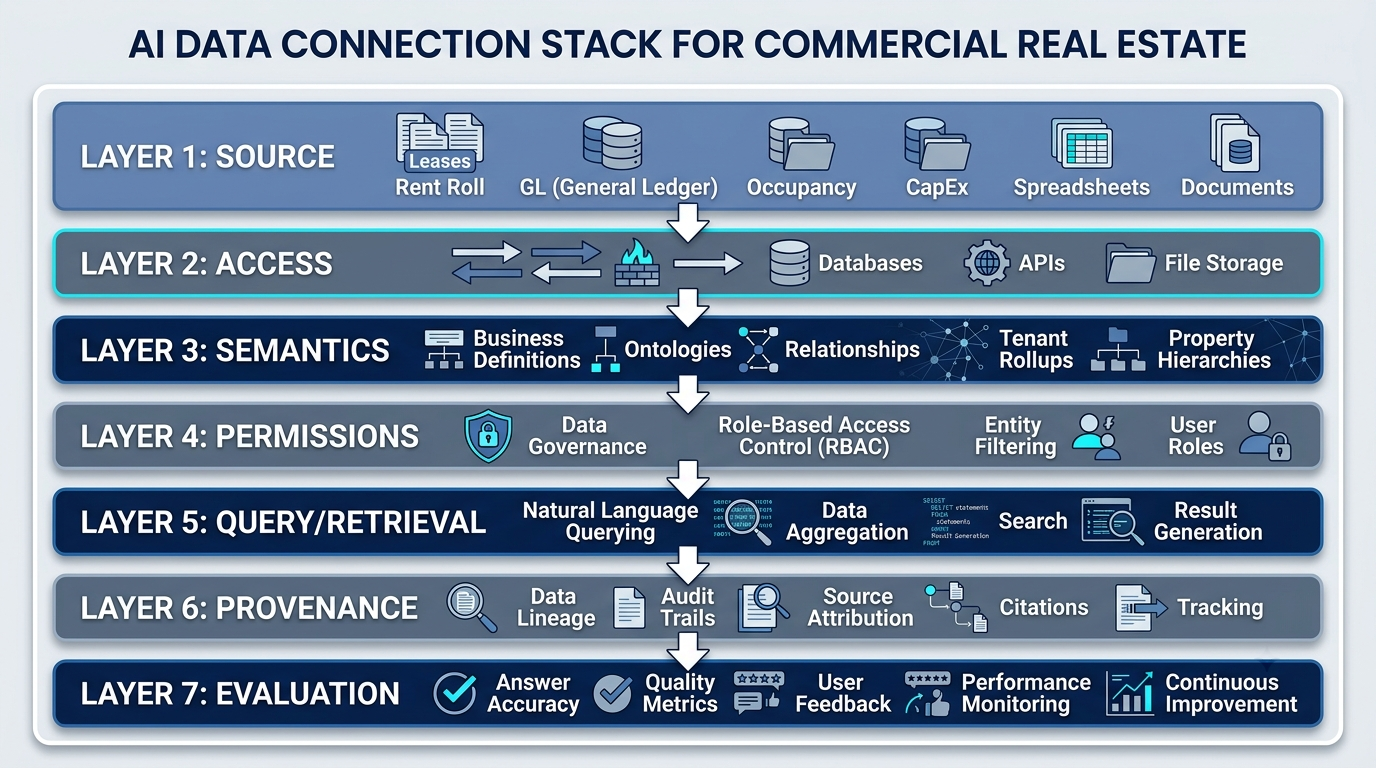
The AI Data Connection Stack
The most useful way to evaluate this architecture is through a seven-layer model:
Source → Access → Semantics → Permissions → Query/Retrieval → Provenance → Evaluation
| Layer | Purpose |
|---|---|
| Source | Stores portfolio information. |
| Access | Provides controlled retrieval paths. |
| Semantics | Defines business meaning and approved calculations. |
| Permissions | Enforces visibility rules before retrieval. |
| Query/Retrieval | Obtains the relevant structured records or document passages. |
| Provenance | Explains where the answer came from and how it was scoped. |
| Evaluation | Tests quality, reproducibility, security, and reliability. |
This framework separates basic technical connectivity from the controls required for trustworthy use.
---
Layer 1: Map the source systems and data grain
Every AI implementation starts with source data. In commercial real estate, that data rarely sits in one system or at one consistent level of detail.
Typical sources may include:
| Data category | Typical contents | Common grain |
|---|---|---|
| Property management | Charges, receipts, tenant records, property operations | Property, tenant, charge, or transaction |
| Financial systems | General ledger, actuals, budgets, account balances | Entity, property, account, and period |
| Lease administration | Commencement dates, expirations, options, rent steps | Lease, suite, tenant, and effective date |
| Occupancy systems | Physical, leased, or economic occupancy records | Property, unit, suite, or reporting period |
| CapEx systems and workbooks | Budgets, commitments, invoices, spend, and forecasts | Project, property, vendor, and period |
| Spreadsheets | Forecasts, assumptions, reconciliations, and management adjustments | Variable and often manually defined |
| Documents | Leases, amendments, reports, memos, and policies | File, page, section, clause, or extracted field |
The architecture should record at least five characteristics for each source:
- System owner: Who is accountable for the data?
- System of record: Which source is authoritative for each field or metric?
- Grain: Does a row represent a property, lease, suite, tenant, account, project, or transaction?
- Effective date: When did the fact become valid, and when was it recorded?
- Refresh behavior: How and when does the source change?
Not all sources are equally reliable for every question. An asset manager's forecast workbook may carry the latest leasing assumptions, while the accounting system carries finalized actuals. The assistant needs rules for deciding which source applies to which question.
---
Layer 2: Choose a controlled data-access path
The access layer determines how approved data becomes available to the assistant. The right method depends on the source, required freshness, performance constraints, and security model.
Direct database access
A read-only database connection can support fresh, structured querying when the schema is stable and the organization can enforce query limits, permissions, logging, and approved views. Direct access should not mean unrestricted access to every production table.
Application programming interfaces
An API can expose governed business objects without revealing the full underlying database. This can simplify permission enforcement and validation, but the available fields, rate limits, and supported filters depend on the source application.
Warehouse or lakehouse access
A warehouse or lakehouse can provide a curated access point across multiple operational systems. This is useful when the organization already reconciles property, tenant, lease, financial, and budget data into shared models.
Curated exports
Scheduled files or approved extracts can support a controlled initial deployment. They are easier to isolate but introduce staleness, versioning, and file-management risks.
Document retrieval
Lease documents, amendments, reports, and memos require a retrieval path that can locate relevant passages and preserve document-level permissions and metadata.
| Access pattern | Strong fit | Main control requirement | Main tradeoff |
|---|---|---|---|
| Direct database query | Fresh structured analysis | Read-only views, limits, and logging | Schema and query complexity |
| API | Governed business objects | Authentication and field-level authorization | Coverage and rate limits |
| Warehouse/lakehouse | Cross-system analytics | Curated models and lineage | Pipeline latency and modeling effort |
| Scheduled export | Controlled pilots | Versioning and refresh ownership | Stale or duplicated files |
| Document retrieval | Leases, reports, and policies | Permission-aware indexing and citations | Extraction and interpretation quality |
The goal is controlled retrieval, not unrestricted system access. For the broader question of moving and reconciling data between systems, see Commercial Real Estate Data Integration: Connecting Yardi, MRI, CoStar, Excel, and More (A15).
---
Structured and unstructured CRE data require different strategies
Structured data and unstructured documents should not be forced through the same retrieval method.
Structured data
Examples include:
- Rent rolls
- Occupancy records
- General ledger transactions
- Budget tables
- CapEx schedules
- Lease dates and rent steps
These sources are typically accessed through validated queries against databases, APIs, warehouses, or curated files.
Unstructured data
Examples include:
- Lease PDFs
- Amendments
- Asset-management reviews
- Investment committee memos
- Property reports
- Policies and operating procedures
These sources require document parsing, indexing, retrieval, and citation at a useful level such as the file, page, section, clause, or extracted record.
Semi-structured data
CRE teams also rely on semi-structured sources such as standardized lease abstracts, recurring Excel templates, exported reports, and forms. These may require both field extraction and document retrieval.
A question such as *“Which tenants have upcoming renewal options, and what did the latest asset review say about each negotiation?”* may require a structured query for option dates and document retrieval for the latest narrative. The assistant must keep the two evidence types distinct and cite both.
---
Layer 3: Build a semantic layer for CRE definitions
A semantic layer maps business language to approved data objects, formulas, hierarchies, and filters. It is what helps an assistant distinguish a fluent response from a correct response.
Suppose a user asks:
Show occupancy across the office portfolio.
The system may need to resolve:
- Whether occupancy means physical, leased, or economic occupancy
- Whether the scope includes every office asset or only stabilized assets
- Whether the reporting period is current month-end, quarter-end, or another date
- Whether area is measured using rentable, usable, or another approved basis
- Whether unconsolidated joint ventures are included
A useful semantic layer documents:
| Semantic component | CRE example |
|---|---|
| Metric definition | Physical occupancy versus leased occupancy |
| Formula | Occupied area divided by approved rentable area |
| Entity hierarchy | Fund → portfolio → property → building → suite |
| Time rule | Month-end snapshot versus daily effective dating |
| Inclusion rule | Stabilized assets only or full portfolio |
| Naming standard | Tenant legal name versus parent-company rollup |
| Allowed variant | Same-store NOI under a named, approved definition |
Each governed metric should have a clear name, definition, formula, grain, source, owner, refresh rule, and allowed variants. Natural language removes SQL syntax for the user, but it does not remove the need for precise business definitions.
For the detailed question-to-query mechanism, see Natural Language Querying for Commercial Real Estate: A Practical Guide (A10).
---
Layer 4: Enforce permissions before retrieval
Permission enforcement should happen before restricted records or fields enter the response-generation process.
A CRE firm may need to isolate information by:
- Fund
- Joint venture
- Client account
- Property
- Region
- Department
- Data domain
- Field sensitivity
A simplified access model might look like this:
| Role | Example scope | Example permitted action |
|---|---|---|
| Asset manager | Assigned properties | Query operational and financial details |
| Regional leader | Properties in an approved region | Compare regional performance |
| Executive | Approved enterprise portfolio | Review aggregated and drill-down results |
| Investor-relations user | Approved reporting datasets | Generate governed reporting inputs |
| Property team | Designated operating assets | Review property-level operations |
| External partner | Specific shared entity or project | Access only explicitly shared information |
Filtering sensitive content after generation is not a reliable security boundary. The source, access layer, and assistant should work together so that unauthorized data is never retrieved for the user.
Permission testing should also consider aggregate leakage. A result may hide tenant-level details but still reveal restricted information through a narrowly filtered total. Service accounts, role changes, inherited permissions, and access recertification require explicit ownership.
For a deeper treatment, see Role-Based Access Control for CRE AI: Keeping Portfolio Data Secure (A40) and Secure AI Chatbots for Commercial Real Estate: What Enterprise Teams Need to Know (A38).
---
Layer 5: Validate queries and retrieval before answer generation
The query and retrieval layer converts business intent into approved access operations.
For structured data, the workflow may include:
- Interpret the user's question.
- Identify the required metric and business definition.
- Resolve property, tenant, lease, fund, and time scope.
- Check whether clarification is required.
- Generate or select a query against approved objects.
- Validate tables, fields, joins, filters, and aggregation grain.
- Apply the user's permissions.
- Execute the query within performance and safety limits.
- Check the result shape before generating an answer.
Query validation can include:
- Allowlisted schemas, views, or APIs
- Read-only execution
- Limits on result size and execution time
- Required filters for high-volume tables
- Checks for mismatched joins
- Detection of unsupported or ambiguous metrics
- Reconciliation against known control totals
For document retrieval, the workflow differs:
- Apply the user's document permissions.
- Identify the relevant repository and document type.
- Retrieve passages using the question and approved metadata.
- Rank passages for relevance.
- Preserve file, page, section, and timestamp details.
- Generate an answer only from the retrieved evidence.
The assistant should be able to stop and ask a clarifying question when the metric, time boundary, entity scope, or inclusion rule remains ambiguous.
---
Layer 6: Preserve provenance and source citations
Provenance is the record of where an answer came from and how it was produced. For CRE analysis, a useful citation should do more than name a database or document.
A reviewable answer may identify:
- Source system or document
- Table, view, report, record, page, or clause where appropriate
- Entity scope
- Date range or effective date
- Filters and inclusion rules
- Metric definition
- Data refresh time
- Permission context
- Relevant assumptions
Consider this answer shape:
Annual base rent associated with leases expiring in the next 24 months: [[FILL: verified result]]
Scope: [[FILL: portfolio or asset scope]]
Definition: [[FILL: annual base rent definition]]
Source: [[FILL: approved lease-data source]]
Filters: [[FILL: expiration window and inclusion rules]]
Data timestamp: [[FILL: source refresh time]]
The citation does not prove that the source data is correct. It makes the answer reviewable, challengeable, and reproducible. That distinction matters when AI-generated analysis enters asset reviews, financial reporting, investment committee materials, or executive presentations.
---
Layer 7: Evaluate answers and observe the operating system
A connection is not ready for production merely because it returns an answer. The organization needs a repeatable way to test whether the assistant understood the request, accessed the correct information, honored permissions, and produced a reproducible result.
Evaluation dimensions
| Dimension | Evaluation question |
|---|---|
| Intent match | Did the assistant answer the business question the user meant? |
| Query correctness | Did the generated query use the right fields, joins, filters, and aggregation? |
| Answer correctness | Does the narrative accurately represent the query result? |
| Permission enforcement | Was every retrieved record authorized for the user? |
| Citation quality | Can a reviewer trace the answer to its sources and assumptions? |
| Freshness | Was the intended data version used? |
| Reproducibility | Can the answer be reconstructed under the same scope and definitions? |
| Performance | Did the workflow complete within operational limits? |
Observability signals
Operational monitoring may track:
- Common question patterns
- Clarification frequency
- Query failures
- Empty or unexpectedly large result sets
- Permission denials
- Citation-opening behavior
- User corrections or flags
- Response latency
- Data-source health
- Model and retrieval changes
Evaluation sets should contain real CRE questions across leases, occupancy, NOI, CapEx, budgets, rent roll, and portfolio comparisons. They should also include intentionally ambiguous requests, unauthorized requests, invalid date ranges, missing entities, and questions that require unavailable external market data.
---
Worked example: Connecting a lease-rollover question to governed CRE data
Consider the request:
Which tenants account for the largest amount of annual base rent expiring in the next 24 months?
1. Source
The architecture identifies the approved lease source, tenant master, property hierarchy, and rent fields. If amendments are stored separately, the implementation determines whether approved structured records already reflect those amendments.
2. Access
The assistant uses a read-only view, governed API, warehouse model, or another approved access path. It does not receive unrestricted access to the entire operational database.
3. Semantics
The semantic layer defines:
- What qualifies as an active lease
- Which expiration date controls
- How annual base rent is calculated
- Whether tenants roll up to a parent company
- Which properties and ownership interests are included
- How partial months, options, or holdovers are treated
4. Permissions
The system restricts the query to the properties, funds, or entities the user is authorized to review.
5. Query and validation
The assistant maps tenant, lease, property, expiration, and rent fields; checks join grain; applies the 24-month window; aggregates by the approved tenant level; and ranks the result.
6. Provenance
The response includes the source, scope, expiration window, annual base rent definition, filters, and refresh timestamp. A reviewer can inspect the evidence behind the ranking.
7. Evaluation
The result is compared with a known report or controlled test case. The team checks whether amendments, joint-venture scope, tenant aliases, and duplicate suites changed the result.
This example shows why the connection architecture matters more than the chat interface. A polished answer can still be wrong if any layer silently applies the wrong definition, grain, scope, or permission.
---
How should freshness and caching be handled?
Freshness should be defined per source and per use case. Financial actuals, leasing assumptions, rent rolls, and extracted lease clauses may update on different schedules.
A production design should disclose:
- The source's last successful refresh
- Whether the answer used live, replicated, or exported data
- Whether a cached result was reused
- How long cached results remain valid
- What happens when a source is unavailable
- Whether a user can request a refresh or re-run
Caching can improve speed and reduce repeated database load, but it can also return outdated information after a lease amendment, month-end close, budget revision, or CapEx update. Cache keys should reflect the user, permission scope, question parameters, semantic version, and source-data version where appropriate.
For high-impact workflows, the interface should make staleness visible rather than hiding it behind a fluent response.
---
Direct database access, APIs, warehouses, and document retrieval: which should you use?
There is no universal connection pattern. The right architecture depends on the question, source, governance model, and technical maturity.
| Requirement | Direct database | API | Warehouse/lakehouse | Document retrieval |
|---|---|---|---|---|
| Fresh structured records | Strong | Strong when exposed | Depends on pipeline | Weak |
| Curated cross-system analysis | Limited | Limited by endpoints | Strong | Limited |
| Readable business model | Depends on views | Often stronger | Strong when modeled | Depends on metadata |
| Lease clauses and narrative | Weak | Limited | Limited unless extracted | Strong |
| Centralized lineage | Requires implementation | Requires implementation | Often easier to centralize | Requires document provenance |
| Permission inheritance | Must be designed | May use app controls | Must be mapped | Must be preserved in indexing |
| Pilot simplicity | Moderate | Moderate | Depends on existing stack | Moderate |
A hybrid architecture is common because a portfolio question may require structured financial or lease facts alongside supporting documents. The implementation should preserve separate evidence paths rather than merging them into an opaque answer.
---
What still needs human review
Connecting an AI assistant to CRE data does not remove the need for domain, data, security, and reporting review.
Source-system errors propagate downstream
If a lease expiration, rent step, occupancy status, or CapEx amount is wrong upstream, the assistant may reproduce the error accurately. Citations help reviewers find the source, but they do not repair it.
CRE definitions can remain disputed
NOI, same-store scope, occupancy, annual base rent, and renewal status may have multiple valid variants. The organization must approve definitions and disclose the variant used.
Mismatched grain creates subtle errors
Joining lease-level records to property-level budgets or tenant-level information can duplicate values without obvious warning. Query validation and reconciliation are required.
Unstructured documents require extraction and validation
Historical leases, scanned amendments, tables, handwritten notes, and inconsistent abstracts can produce incomplete retrieval. Material obligations should not be accepted without appropriate review.
Market judgment is not contained in internal data
An internal assistant cannot reliably determine leasing strategy, investment quality, market direction, tenant behavior, or asset value without the required external data and human judgment.
Permissions drift over time
Role changes, property assignments, fund structures, joint ventures, and service accounts change. Access rules require testing, recertification, and audit ownership.
Generated deliverables still require sign-off
PowerPoint, Excel, and Word outputs should be reviewed before investor, lender, legal, fiduciary, or executive use. A governed workflow supports review; it does not eliminate accountability.
---
Staged implementation checklist
Use the following checklist to connect an AI assistant to CRE data without treating the first successful query as production readiness.
Stage 1: Define the use case
- Select a narrow CRE workflow.
- Identify the intended users and decisions.
- List the questions the assistant should answer.
- List the questions it must refuse, clarify, or escalate.
- Define what counts as an acceptable, cited answer.
Stage 2: Inventory sources
- Identify structured, semi-structured, and unstructured sources.
- Record system owners and systems of record.
- Document grain, identifiers, effective dates, and refresh behavior.
- Identify duplicate or conflicting values.
- Classify sensitive fields and entity scopes.
Stage 3: Govern semantics
- Define metrics, formulas, and allowed variants.
- Model property, tenant, lease, fund, and suite hierarchies.
- Establish inclusion and exclusion rules.
- Define time boundaries and currency or unit rules.
- Assign owners for semantic changes.
Stage 4: Design access and permissions
- Select database, API, warehouse, file, or document-retrieval paths.
- Use read-only access where appropriate.
- Map user identity to source and application permissions.
- Define row-, column-, document-, and entity-level restrictions.
- Add audit logging, performance limits, and failure handling.
Stage 5: Build retrieval and validation
- Restrict the assistant to approved objects and actions.
- Validate query fields, joins, filters, and aggregation grain.
- Preserve document metadata and passage locations.
- Add clarification behavior for ambiguous questions.
- Prevent unsupported source combinations.
Stage 6: Add provenance
- Return source, scope, filter, definition, and timestamp details.
- Expose assumptions and source precedence.
- Make citations inspectable at an appropriate level.
- Ensure an answer can be reconstructed.
Stage 7: Evaluate and red-team
- Create controlled questions with known answers.
- Test valid, ambiguous, unauthorized, and unsupported requests.
- Check tenant aliases, lease amendments, date boundaries, and duplicate grain.
- Test stale data, unavailable sources, and permission changes.
- Record failures and assign remediation owners.
Stage 8: Operate and expand
- Monitor question patterns, failures, latency, and corrections.
- Review permissions and metric definitions regularly.
- Add sources only after the earlier controls remain stable.
- Version semantic rules and evaluation sets.
- Keep human review gates for high-impact outputs.
---
Turn portfolio questions into governed answers
See how Bayaan helps CRE teams connect governed business data, investigate portfolio questions, and generate trusted outputs.
Talk to BayaanQuestions to ask a vendor or implementation partner
- Which structured and unstructured CRE sources can the system access today?
- Does it query live data, replicated data, curated exports, or a combination?
- How are business definitions such as NOI, occupancy, and annual base rent governed?
- Where are permissions enforced: before retrieval, during query execution, or after generation?
- How are fund, joint-venture, property, region, and field-level scopes represented?
- What happens when a user's question is ambiguous?
- How are generated queries validated before execution?
- What source details appear with an answer?
- How does the system disclose data freshness and cached results?
- Can a reviewer reproduce an answer using the same scope and definitions?
- How are query failures, permission denials, and user corrections logged?
- What evaluation set is used for CRE-specific questions?
- How are model, semantic, schema, and source changes tested?
- How does the system handle conflicting values across databases, spreadsheets, and documents?
- Which capabilities are live, and which are roadmap items?
A credible answer should describe controls and evidence, not rely only on statements about model quality.
---