
In this article
The same monthly ops report gets built the same way every cycle: pull the close, calculate variance, write commentary explaining what moved, drop it into last month's template, get it reviewed, send it out. Nothing about that sequence changes month to month except the numbers, which is exactly why it's a strong candidate for automation and exactly why teams get nervous about automating it. A recurring report that goes out under the firm's name carries real consequences if a step gets skipped.
This article covers what can actually be automated in a recurring CRE reporting cycle, what has to stay human, and how a team moves from doing every step manually to a governed, largely automated workflow without losing the review discipline that makes the output trustworthy. It includes a step-by-step classification of the reporting cycle and a maturity framework for how that automation should be built up over time, not switched on all at once.
Key takeaways
- Automated CRE reporting targets the recurring cycle specifically: the same report, produced on the same schedule, with a structure stable enough to automate safely.
- The recurring reporting cycle breaks into eight distinguishable steps, and each one falls into a different bucket: automatable, assisted, or strictly human.
- "Investor-ready" is not a speed claim. It still requires governed data inputs, consistent template rules, narrative review, and a final human sign-off before anything goes out.
- Automation should be built up in stages rather than switched on all at once; skipping straight to full automation removes the review gates that catch errors before distribution.
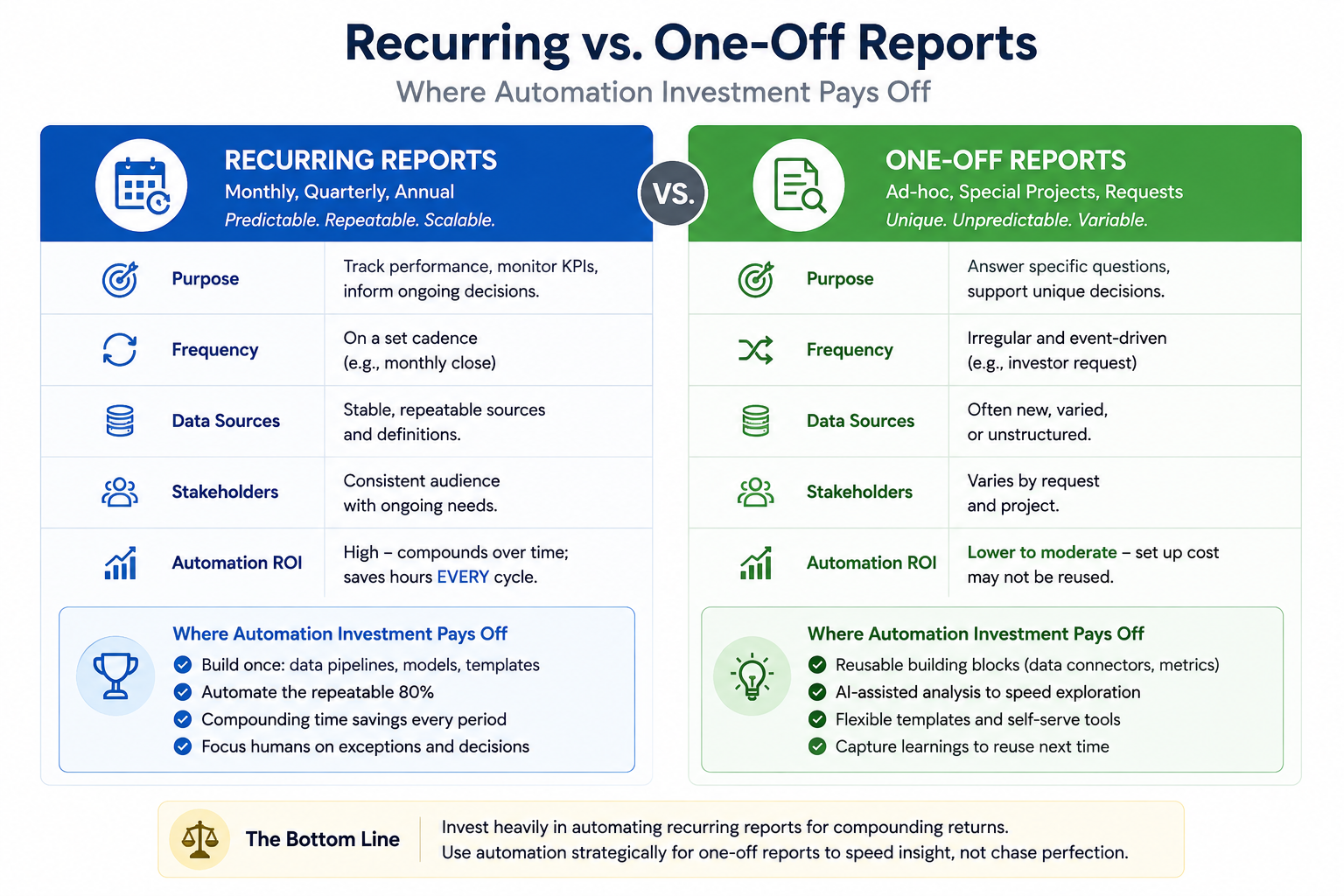
- Recurring reports and one-off reports need different automation strategies: recurring reports benefit from stable, repeatable workflows, while one-off requests benefit mainly from faster access to governed data underneath a custom structure.
- Any specific time-savings figure for automating a reporting cycle should come from a firm's own measured before-and-after data, not a generic industry percentage.
What "automated CRE reporting" actually covers
Automated CRE reporting is the use of AI to handle the repeatable steps of a recurring reporting cycle — the same report, produced on a fixed schedule, following a structure that doesn't change much from one cycle to the next. That stability is what makes automation viable in the first place. A report built fresh every time from a different structure and a different audience doesn't automate the same way, because there's no repeatable pattern underneath it to build workflow rules around.
This is narrower than AI reporting as a category, which spans one-off deliverables, format-specific output like PowerPoint or Excel, and the full lifecycle from analysis to distribution. It's also distinct from the content and structure of a specific report type, such as an asset-management review — that's a question of what goes into the report, not how the recurring production of it gets automated.
Automation done well removes the repetitive assembly work from a reporting cycle: pulling the same figures, building the same charts, matching the same template. It does not remove the judgment calls about what the numbers mean or the sign-off required before the report reaches its audience.
The recurring reporting cycle, step by step
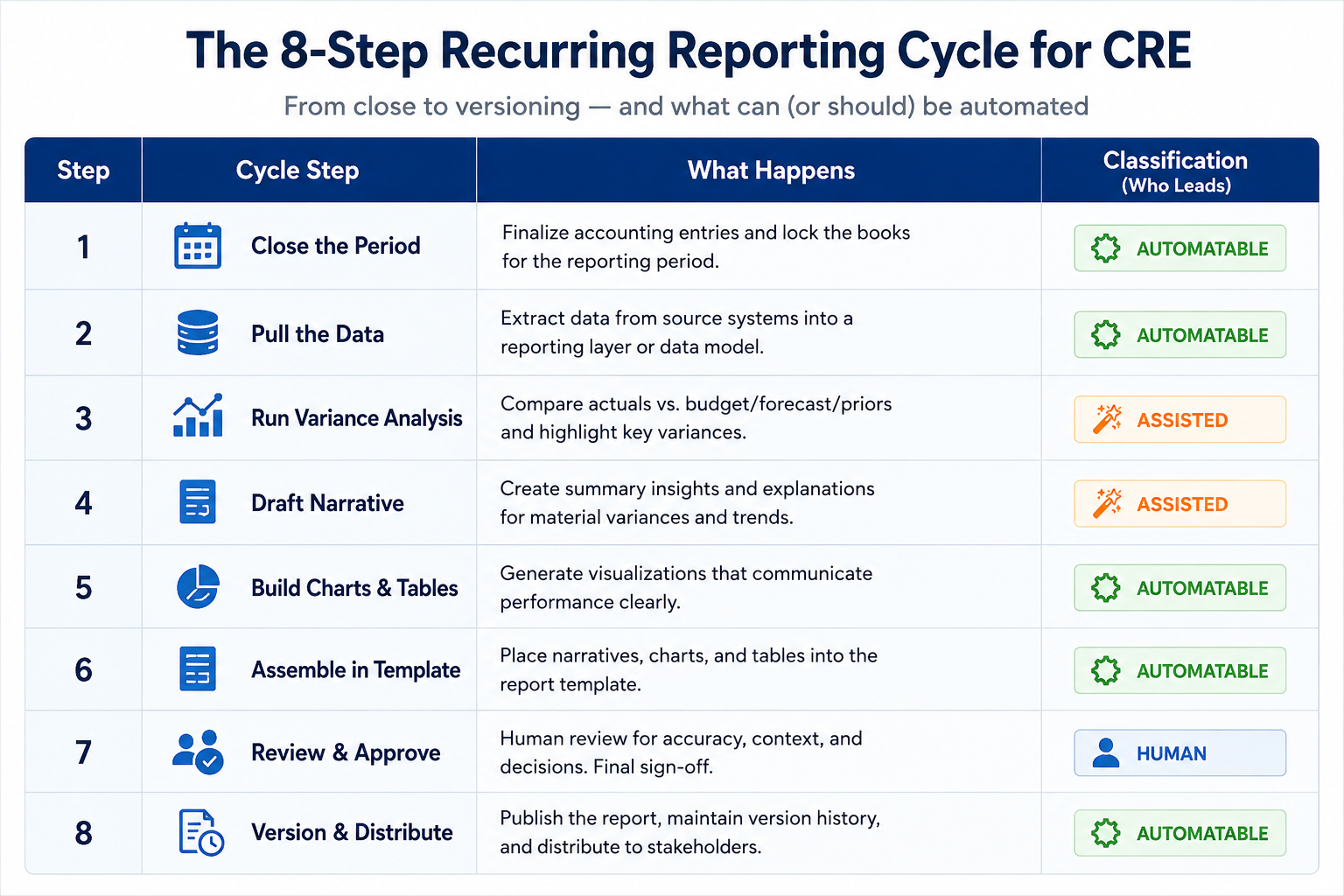
A recurring report moves through eight identifiable steps every cycle. Some genuinely automate well. Others benefit from AI assistance but still need a person driving them. A few should never be fully automated, regardless of how mature the workflow gets.
| Step | What happens | Classification |
|---|---|---|
| Close | The accounting period closes and figures become final | Human-gated (accounting owns this; automation waits for it) |
| Data pull | Pulling current figures from the source systems | Automatable |
| Variance analysis | Calculating period-over-period change and identifying movement | Automatable, with human review of what counts as material |
| Draft narrative | Writing commentary explaining what changed and why | Assisted — AI drafts, a person edits for tone and accuracy |
| Charts/tables | Building the visual elements that support the narrative | Automatable |
| Template | Matching the firm's layout, branding, and structure | Automatable, with periodic human maintenance as templates change |
| Review | Checking the draft against source data before it moves forward | Strictly human |
| Versioning | Saving the approved draft as a distinct, traceable version | Automatable |
The pattern worth noticing: the steps that automate cleanly are mechanical — pulling data, building charts, applying a template, saving a version. The steps that stay human are the ones involving judgment about materiality, accuracy, and what the report is actually saying. A workflow that tries to automate the review step specifically is automating away the one checkpoint that catches everything else.
Provenance and review gates
Automating the mechanical steps only works if provenance survives the process — meaning every figure in the final report can be traced back to the source system and the exact period it came from. Without that, a faster reporting cycle just produces polished output faster while making it harder to catch when something's wrong, because there's no visible trail back to where a number originated.
Review gates are the checkpoints where a human has to approve before the workflow proceeds, and they need to be explicit rather than assumed. A gate after the draft narrative catches tone and accuracy problems before they reach a template. A gate before distribution catches anything that slipped through earlier steps. The mistake teams make when automating a reporting cycle for the first time is treating "review" as one step at the very end, rather than as multiple checkpoints placed where errors are actually likely to appear — right after data pull, right after narrative drafting, and again right before the report leaves the building.
Recurring reports versus one-off reports
Not every report a CRE team produces fits the recurring-cycle model, and treating a one-off request the same way as a monthly ops report usually wastes effort in one direction or the other.
Recurring reports — monthly ops updates, quarterly investor letters, standing board packages — are the strongest automation candidates because the structure, cadence, and audience are stable. Building a repeatable workflow around a report that doesn't change shape from cycle to cycle pays off quickly, because the same automation keeps working every time.
One-off reports — a special-situation memo for one property, an ad hoc board request ahead of an unscheduled meeting — don't benefit the same way from a fixed template workflow, because the structure itself is custom each time. What still helps is faster access to governed, cited data underneath the report: pulling the right figures quickly is valuable whether the final document follows a standard template or not. The automation investment for one-off reports should go into the data layer, not into building a rigid workflow around a report structure that won't repeat.
The Reporting Automation Ladder
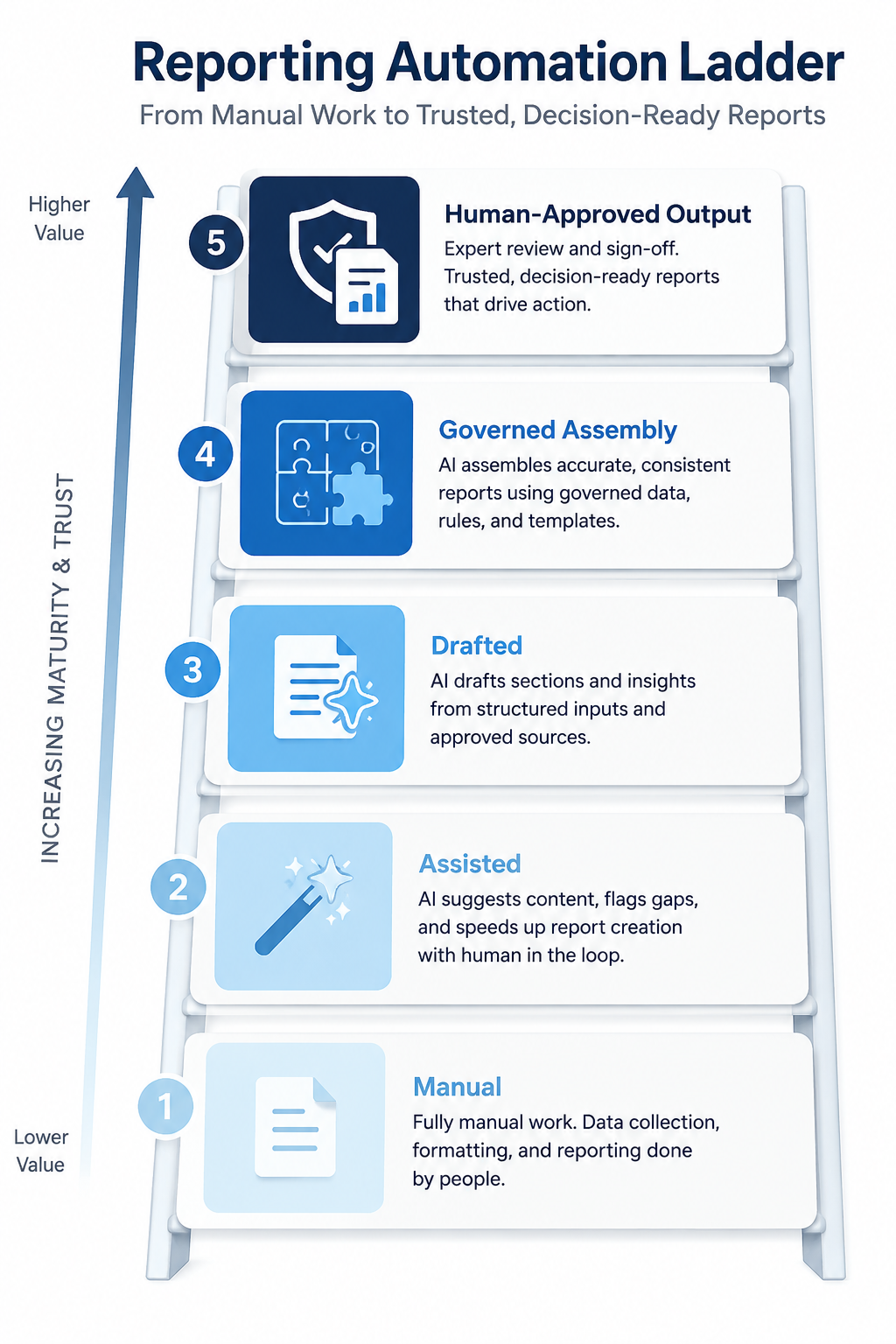
Automating a recurring reporting cycle is not a single switch. Teams that try to jump from fully manual to fully automated in one step tend to remove review gates along with the manual work, which is where errors start reaching distribution. The Reporting Automation Ladder describes five stages a recurring report typically moves through, each with more automation and more built-in governance than the last.
- Manual — every step done by hand each cycle: pulling data, calculating variance, writing narrative, building charts, formatting, and distributing, with no automated assistance.
- Assisted — AI helps with individual steps, such as pulling figures or drafting a first-pass narrative, but a person still assembles the pieces into a finished report.
- Drafted — AI produces a full first draft, including narrative, charts, and template formatting, that a person edits and finalizes before it moves forward.
- Governed Assembly — AI assembles the report end-to-end from governed, cited inputs, matched to the firm's template, with explicit review gates built into the workflow rather than a single check at the end.
- Human-Approved Output — the steady state: automation reliably produces a report ready for final sign-off every cycle, but that sign-off remains a required, non-negotiable step regardless of how consistent the automated output becomes.
Applied to a real cycle: a reporting owner's monthly ops report over four consecutive quarters. In Q1, the report is built entirely by hand — a day and a half of work each month. In Q2, the team introduces AI-assisted data pulls and a first-pass narrative draft, cutting the manual assembly time but still building the final document by hand. By Q3, AI produces a full draft — narrative, charts, and formatted template — that the reporting owner reviews and edits rather than builds from scratch. By Q4, the workflow reaches Governed Assembly: every figure carries a citation back to source, the template updates automatically when brand guidelines change, and review gates sit after the draft and before distribution. The report still requires the reporting owner's sign-off every month — that step doesn't disappear as the ladder climbs, because it's the one rung the framework never removes.
Where automated reporting falls short
Automation reduces the manual labor in a recurring reporting cycle. It does not remove every risk in the process, and a few limits apply specifically to automation rather than to AI reporting in general.
Automated workflows break when the source data model or the report template changes without a corresponding update to the workflow itself. A new GL account structure, a revised chart of accounts, or an updated brand template can silently produce a broken or mismatched report if nobody updates the automation to match. Time savings vary significantly by portfolio complexity, report structure, and how much manual cleanup a firm's existing process already required — a fixed percentage claim rarely holds across firms, which is why any specific figure needs to come from a firm's own before-and-after measurement rather than an industry-wide estimate. Over-automating without maintaining explicit review gates creates a single point of failure: if no one is actually checking output at the right checkpoints, an error can propagate silently into every subsequent cycle rather than getting caught once. Governed assembly still requires ongoing ownership of metric definitions and template rules — automation doesn't eliminate that governance work, it just moves the burden further upstream, to the people responsible for keeping definitions and templates current.
[[SME: What's a real example of a recurring report automation breaking because a source system or template changed without a corresponding update to the workflow?]]
Build a governed reporting workflow
Turn cited CRE data into reviewable recurring reports that follow your templates.
Talk to BayaanHow to start automating a recurring reporting cycle
Teams get the best results by starting narrow and proving the workflow on a low-stakes report before extending it to anything investor-facing.
- Identify the recurring report with the most stable structure and highest frequency — that's usually the best place to start, because the repeatable pattern pays off fastest.
- Map every step of that report's current cycle and classify each one honestly as manual, assisted, or automatable today, not aspirationally.
- Build in explicit review gates before removing any manual step, rather than removing steps first and adding checks later.
- Pilot the automated workflow on an internal-only cycle for at least one full reporting period before extending it to anything investor- or lender-facing.
- Measure actual time spent per cycle before and after automation for that specific report, rather than assuming results from a different team or a general industry figure.
- Revisit the step classification whenever the source system, template, or metric definitions change, since that's exactly when automated workflows tend to break silently.