
In this article
Most CRE teams already know how to build the deck. The work is repetitive: pull this quarter's NOI variance, drop in the occupancy chart, update the CapEx table, rewrite three bullets that say roughly the same thing as last quarter with different numbers. None of it is hard. All of it is slow, and it happens right before a board meeting or an investor call, when time is already short.
Generating slides from data is not the hard part anymore. The hard part is generating a deck that actually matches the firm's template, states the right level of detail for the audience in the room, and lets a reviewer trace every number on the slide back to where it came from. A deck that looks finished but cannot be checked is not ready for a board.
This article covers how AI can turn CRE data into a presentation: planning what belongs on each slide, generating charts and tables that hold up, keeping template and brand fidelity intact, preserving source citations behind every claim, and where a human still needs to review the deck before anyone presents it.
Key takeaways
- Generating a slide from data is straightforward; matching the firm's template, tone, and level of detail is the part that actually takes engineering and review work.
- A useful AI-generated deck preserves a chain from the source data through the metric, the visual, the claim on the slide, and back to something a reviewer can check.
- Narrative compression, fitting an analysis into one slide, is where AI-generated decks most often lose an important qualifier or caveat.
- Speaker notes and audience-specific framing still need a human, since the same NOI variance reads differently to an investment committee than to a lender.
- Every version of an AI-generated deck should be saved so a reviewer can compare what changed between drafts before approving the final version.
- A deck is not presentation-ready just because it was AI-generated and looks polished; it is ready once a named reviewer has checked the numbers against the source.
What Does "AI-Generated PowerPoint" Actually Mean for CRE Teams?
An AI-generated PowerPoint deck, in a CRE context, is a presentation drafted directly from portfolio data, such as occupancy, NOI, CapEx, or lease data, with the underlying source attached to each figure so a reviewer can verify it before the deck goes out.
This is different from asking a general chatbot to "make me a slide about our portfolio." A general-purpose assistant with no connection to live data will produce a plausible-looking slide with invented or outdated numbers. A CRE-specific AI reporting workflow instead pulls the actual current figures from governed data sources, drafts the slide language and visuals around those figures, and keeps the source citation attached so a human can check the claim before anyone sees the slide in a meeting.
The quality bar for a deck like this has three parts: the numbers have to be current and correct, the slide has to match how the firm actually presents (its template, its level of technical detail, its house style for charts), and a reviewer has to be able to find the source behind any number someone in the room might question.
Slide Planning and Data Selection
Before any slide gets built, someone, human or AI, has to decide what belongs on it. A common failure mode is putting too much on one slide because the underlying data supports it, rather than choosing the two or three numbers that actually matter for that audience.
Good slide planning starts from the question the audience is going to ask, not from the data available. An investment committee slide on a property's performance usually needs NOI variance, occupancy trend, and any major lease event, not every metric in the portfolio dashboard. A property-level operations review might need far more granular detail, including a full rent roll excerpt or a unit-by-unit vacancy breakdown.
Data selection follows the same logic: pull only what the slide's stated purpose requires, at the grain, asset, property, or portfolio, that matches the question being answered. A portfolio-level summary slide populated with property-level noise is as unhelpful as an executive summary written before the supporting detail exists.
From Chart to Claim: Generating Visuals and Compressing the Narrative
A chart generated directly from source data is only useful if it is the right chart type for the claim it is supporting. A trend in occupancy over eight quarters belongs on a line chart. A one-time comparison of budget versus actual CapEx belongs in a table or a simple bar chart, not a line chart implying a trend that is not there.
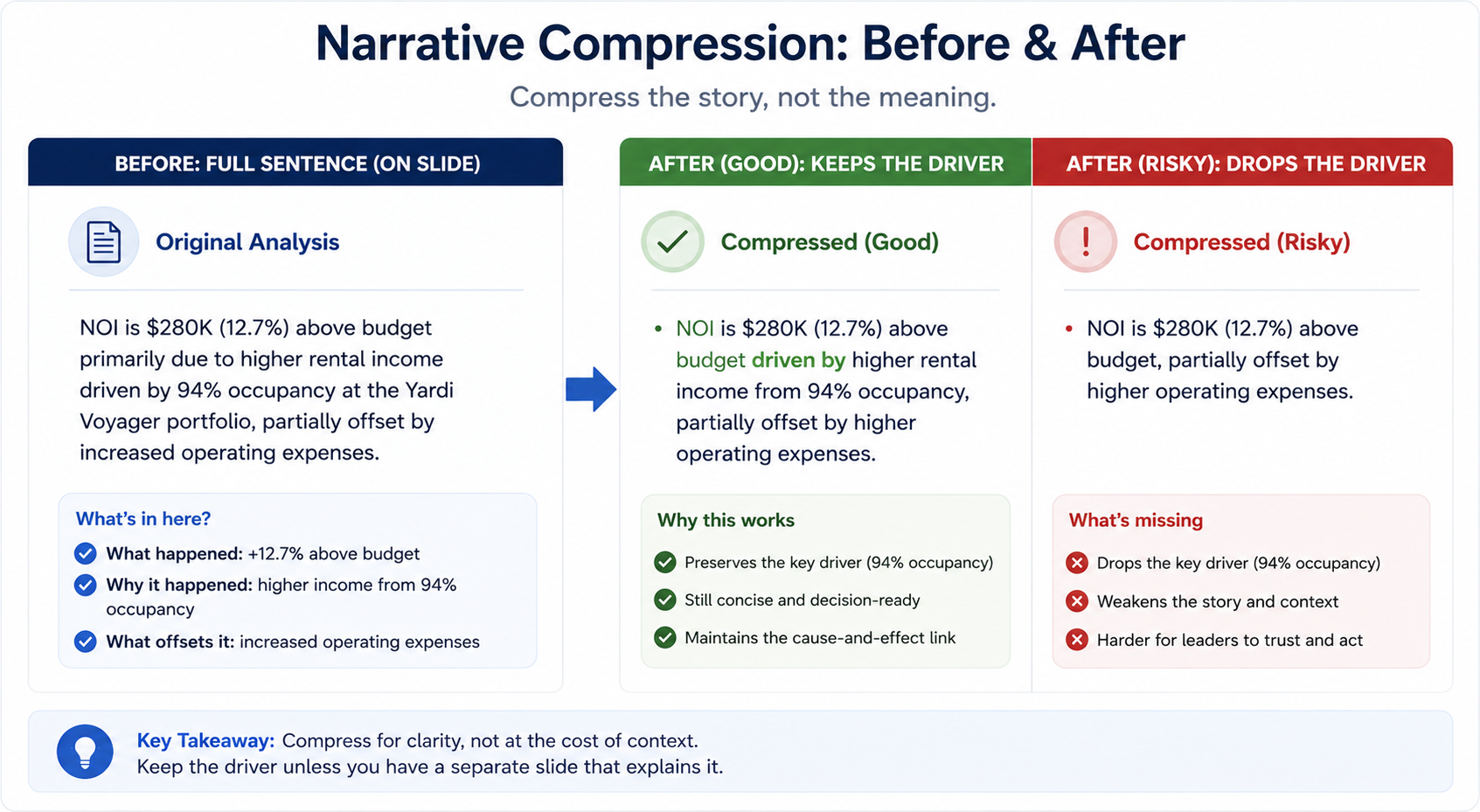
Narrative compression, turning a page of analysis into two or three bullets, is where AI-generated decks most commonly lose something that matters. A variance explanation that reads clearly in a full paragraph can become misleading once compressed to a single bullet if the qualifier gets cut along with the length. "NOI was down 6% against budget, driven primarily by a one-time tenant improvement allowance" becomes a very different claim if compressed to "NOI down 6%" with the driver dropped.
The safest approach is to compress language, not meaning: keep the driver attached to the number even in a shortened bullet, and push the fuller explanation into speaker notes rather than cutting it entirely.
Matching the Firm's Template and Brand
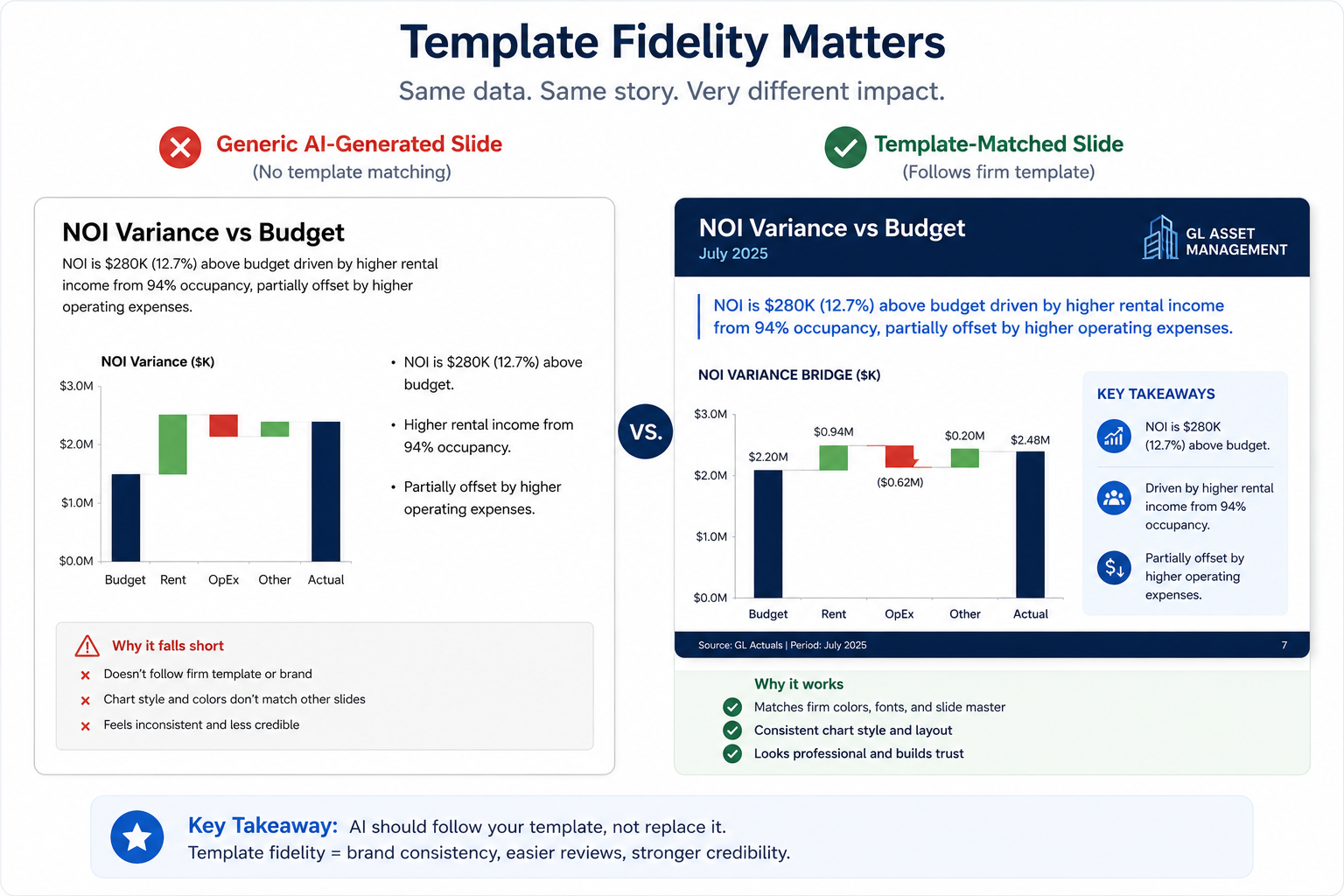
A technically accurate deck that does not match the firm's actual template creates its own kind of rework. Slide masters, color coding for positive and negative variance, chart styles, and logo placement are usually specific enough that a generic AI-generated slide will look obviously different from the rest of the deck library, even if every number on it is correct.
A system like Bayaan, built by Al Rafay Consulting on Microsoft Azure, generates PowerPoint output matched to the customer's own brand and templates rather than a generic layout, with each revision saved as a version a reviewer can step back through. That template match still needs a first-pass human check, particularly around edge cases the template was not originally designed for, such as a property with an unusually long name or a chart with more data series than the template's default layout expects.
Citations and Speaker Notes: What a Reviewer Needs Behind Each Slide
Every material number on an executive slide should trace back to a source a reviewer can actually check: the report or query that produced it, and the as-of date. A slide that states "NOI down 6% quarter over quarter" without a way to verify that number is not meaningfully different from a slide with no source at all, since a reviewer has to either trust it blindly or reconstruct the analysis from scratch.
Speaker notes deserve a separate mention because they carry judgment a slide's bullets usually cannot. The same NOI variance might warrant a confident, brief mention to an investment committee that already expects some quarter-to-quarter movement, and a more detailed explanation to a lender reviewing covenant compliance. Drafting the underlying explanation can be automated; deciding how much of it belongs in front of a specific audience is a human call.
Versioning and Human Review Before It Reaches an Audience
An AI-generated deck should never be a single, overwritten file. Each draft, from the first automated pass through every reviewer edit, should exist as a version a reviewer can open, compare, and roll back if a later edit introduces an error.
Review itself has to happen before distribution, not after. A named reviewer should confirm that every material number matches its source, that the compressed bullets have not dropped a driver that changes the meaning of a claim, and that the deck matches the template closely enough that nothing distracts from the content in the room.
The Slide Provenance Chain
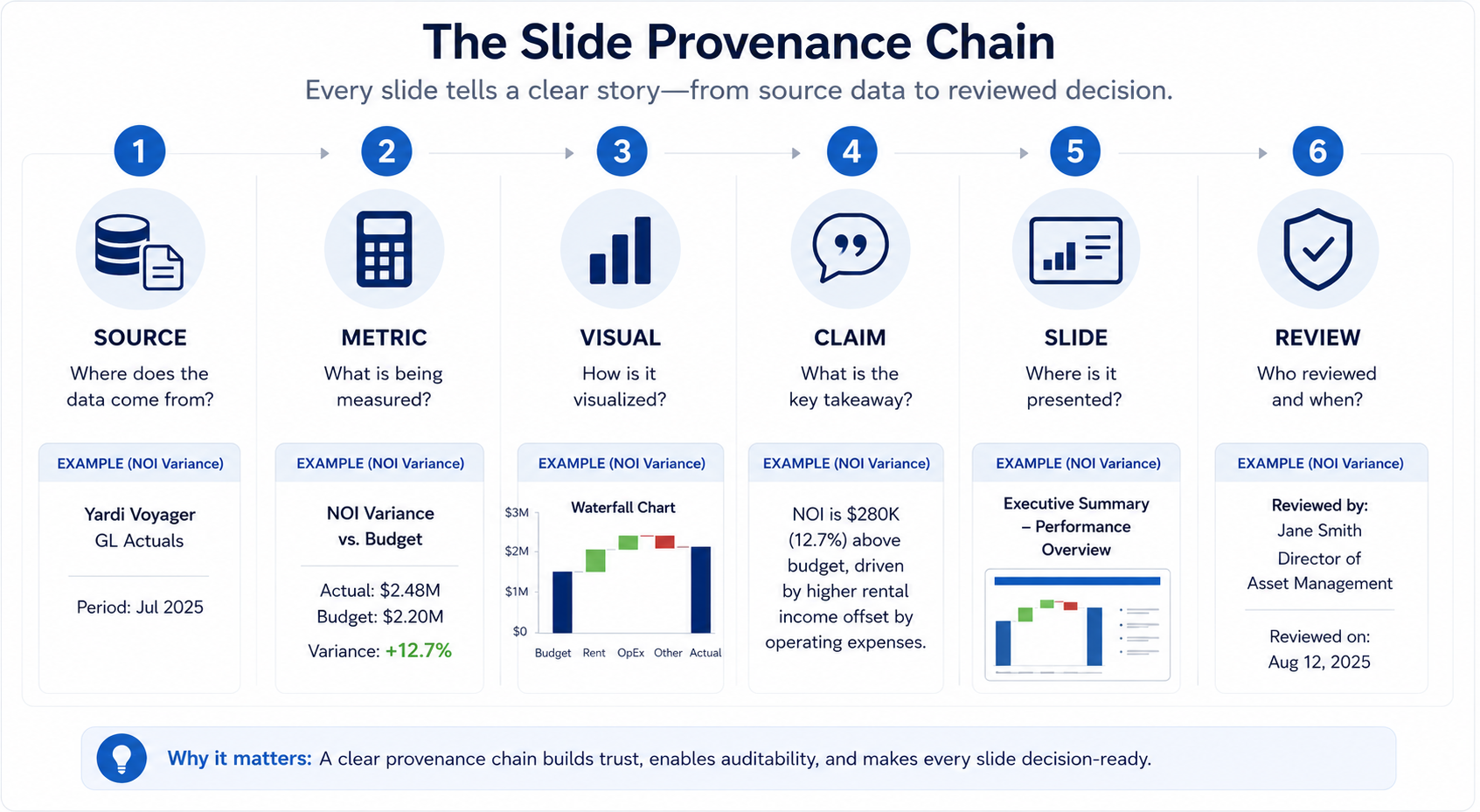
Use this sequence to check any slide before it goes into a deck: Source, Metric, Visual, Claim, Slide, Review. A slide that skips straight from a metric to a claim, with no visible visual logic or review step in between, is the one most likely to say something the data does not actually support.
| Step | What It Answers | Worked Example |
|---|---|---|
| Source | Where did this come from | Q3 general ledger export and budget file for the property |
| Metric | What number is being reported | NOI variance versus budget, quarter over quarter |
| Visual | What chart or table represents it | Bar chart comparing actual versus budgeted NOI by month |
| Claim | What does the slide say about it | "NOI down 6% against budget, driven by a one-time tenant improvement allowance" |
| Slide | Where does it live in the deck | Investment committee update, slide four, financial performance section |
| Review | Who checked it before distribution | Asset manager confirms driver against the approved tenant improvement request before the deck is finalized |
Every field in that chain should be answerable for any slide a reviewer questions. If the claim cannot be traced back through the visual to the source, the slide is not ready, regardless of how clean it looks.
Where This Falls Short
An AI-generated deck has specific, real limits, not just a general need for "human oversight."
Narrative compression loses nuance by design. Squeezing an analysis into one or two bullets will sometimes cut the qualifier that changes what the number means, and no amount of automation removes the need for a human to check that the shortened version still tells the truth.
Template fidelity breaks at the edges. A slide template built around typical property names, typical chart series counts, and typical text lengths will produce awkward results for the property or metric that does not fit those assumptions, and those edge cases usually surface only when someone actually opens the deck.
A citation on a slide proves the number is traceable, not that it is correct. If the source system itself has an error, an AI-generated slide will faithfully carry that error forward with a citation attached, which can create false confidence rather than genuine verification.
Audience judgment does not automate. Deciding how much detail belongs on a board slide versus a lender slide versus an internal operations review is a judgment call about the audience and the relationship, not a pattern an AI system can infer from the data alone.
Make every executive slide reviewable
Turn approved CRE analysis into presentation-ready output without losing its source context.
Talk to BayaanHow to Review an AI-Generated Deck Before a Meeting
- Every material number has a visible source and an as-of date.
- Each chart type matches the claim it supports, trend charts for trends, comparison charts for one-time comparisons.
- Compressed bullets still carry the driver, not just the headline percentage.
- The deck matches the firm's template: colors, fonts, logo placement, and slide master.
- Speaker notes reflect the actual audience for this specific meeting, not a generic explanation.
- A prior version exists to compare against, so a reviewer can see what changed since the last draft.
- A named human reviewer has approved the deck before it is presented.